๐ Power your productivity with the hub that rules them all!
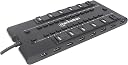
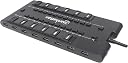
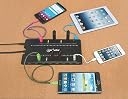
The Manhattan 28 Port USB Hub (Model 161718) is a professional-grade, high-capacity USB hub featuring 28 portsโincluding 4 SuperSpeed USB 3.0 ports with up to 5 Gbps transfer rates. Equipped with a robust 4-amp power adapter and individual port power switches, it offers superior device management and safety with overcurrent protection and hot-swappable functionality. Its compact design with side-panel connections and magnetic base optimizes workspace organization. Compatible with all USB-enabled computers, this hub is ideal for professionals needing reliable, high-speed connectivity for multiple peripherals.
| ASIN | B0074024XU |
| Additional Features | Play, Plug |
| Brand | MANHATTAN |
| Color | Black |
| Compatible Devices | Card Readers |
| Customer Reviews | 3.8 out of 5 stars 158 Reviews |
| Data Transfer Rate | 5000 megabits_per_second |
| Global Trade Identification Number | 00163120253838, 00766623161718 |
| Hardware Interface | USB 2.0 |
| Item Part Number | 161718 |
| Item Type Name | Manhattan MondoHub (28 ports, 4 USB3.0 ports) 161718 |
| Item Weight | 12.8 ounces |
| Manufacturer | Manhattan |
| Mfr Part Number | 161718 |
| Model Number | 161718 |
| Number of Items | 1 |
| Number of Ports | 28 |
| Special Feature | Play, Plug |
| Total USB Ports | 28 |
| Total Usb Ports | 28 |
| UPC | 872182793182 069991993982 523160951628 523160928255 734911123861 013318016441 021113042831 317005142575 078667290973 711275253441 021111196253 131472597450 041114637225 151902980553 521375512207 611101186090 012951688695 785528283974 012302975115 849442154007 734911337237 887192544372 031112827179 617407283105 070090133735 100177417462 045556026456 163120253838 766623161718 168141512803 |
| Unit Count | 1 Count |
| Warranty Description | 3 year limited lifetime |
H**Y
Now THIS is a hub! A tremendous value
I admit I've had this hub for only a few hours, but I'll be back to update / correct if anything "funny" turns up. It "just works" right out of the box, which is a LOT more than I can say for some (ahem) other vendors' products. The combination of on-board USB 3.0 and 2.0 is brilliant. This is actually called the MondoHub, made by Manhattan Products (per the product insert in the box). My system: *** - MacBook Air (2012 model) w/max memory, two USB 3.0 ports and one Thunderbolt port - 10 USB 2.0 devices connected to this hub: four kinds of printers, USB audio, external keyboard with mouse plugged into the keyboard, DVD-RW drive, Epson scanner, 1 Jawbone bluetooth headset in its charging connector, and an occasionally connected iPhone - 3 USB 3.0 devices (2 external hard drives, 1 USB 128gb thumb drive) *** I have tested all of these devices attached together to the MondoHub and they are all working perfectly. In particular, the external drives (2 TB each) are doing the critical backups (both Time Machine and other) on the system, and are "talking" to one another and the laptop very reliably. (You can count, so you can tell I have a lot of USB ports still available.) Is it enough to have four USB 3.0 ports? In my case, absolutely. Think about it: what do you need the higher speeds of USB 3.0 for? For data drives, of course. You don't need it for printers, keyboards, audio, and other such basic devices. So why pay for all-3.0 when you don't need it? Plus, by far the vast majority of device types are still USB 2.0 anyway: it's everywhere, universally supported, and very stable. For many years the odds are that most brand-new devices you buy will still be USB 2.0. Now you've got one hub to rule them all. (Sorry, couldn't help myself.) I'm enthusiastic partly because, for many years, I've had to gang together several 2.0 hubs, but with wildly varying results. When I was running Windows, it was pretty ridiculous -- devices dropping off and coming back on for no apparent reason, taking forever to connect, etc. After I switched to a Mac a couple of years ago, things got instantly better. But things were still messy, and I still didn't have USB 3.0. I just did my own personal benchmark, and can affirm that I am definitely getting the same speeds from the MondoHub's USB 3.0 ports as if the same drives were connected directly to my on-board ports on the MacBook Air: 6 mins. 33 seconds to transfer a 9.86 gb file (an iPhoto library) from the MacBook to the external drive. And this was even while the system was doing a large Time Machine backup to the 128gb thumb drive also attached to the MondoHub. I haven't decided if the on/off buttons for each port are a big help or not. (I imagine they would be if, for some reason, you wanted to reboot a USB connection.) And the USB cable from the hub is hard-wired, so you can't just jack in your own (longer) cable. (Now that I think about it, this is a big plus because it means that The Worst cannot happen: the main cable to your hub accidentally slipping out, and trashing all the live connections to all your external drives all at the same time. THAT thought makes me shudder.) OK, so the built-in cable is fine for my needs: about 3 feet long. So far, all I really need to know: it works. (And I was highly skeptical it would.) The only thing that at first concerned me was, on first boot-up after connecting it, my MacBook took a couple of minutes to finally boot. This has NOT happened on subsequent boots, which are very fast, presumably because the first boot involved drivers being configured for the first time. CONCLUSION: THIS IS INDEED THE HUB YOU'VE BEEN LOOKING FOR. I sure as heck have -- for years. It's great to get an item exactly "as described". Thanks to Manhattan Products for FINALLY solving a longstanding personal computing problem that no one else has noticed yet. I will update as new information arises. ________________ UPDATE - OCT. 27, 2012: Seems to work great under Windows as well. I boot my MacBook Air to Windows occasionally to work with my one essential work application that is Windows-only. I realized I hadn't tested that. As usual with booting to Windows, I found it best to first unplug the hub from the laptop, then do the boot-up. (As with all other hubs I have used in this scenario, if I boot with any hub plugged in, Windows takes FOREVER to boot up. Plugging in after the boot clears that up.) But, once booted and plugged in, all devices I tested work fine: trusty black-and-white laser printer, external sound card, keyboard and mouse combination. But, most importantly, ALL of my USB 3.0 external drives were there (as well as one USB 2.0 drive that I keep formatted for NTFS). I certainly don't use all of my USB 2.0 devices under Windows (as I only occasionally need Windows), but the tested ones work great. So, I continue to say about this hub: Go for it! ________________ UPDATE - MAY 28, 2013: Not much new to report except that all is still well and working as described above. As the manufacturer notes clearly in the product documentation, this hub (like all others I've seen) does not output sufficient voltage to charge an iPad. With an iPad, you are always best off using a dedicated iPad charger, or your on-board USB port. Still a great hub and very glad I found it. ________________ UPDATE - Sept. 11, 2013 - USE THE GREAT MAGNET MOUNTS This hub comes with magnets embedded in the feet on the bottom. I bought a 12"x12" M-D Building Products 56032 1-Feet by 1-Feet Galvanized Steel Sheet , screwed that to the credenza on my desk, and it worked great! The hub is now mounted vertically with the magnets and I can pop it off anytime to plug in a new cable. Nice feature to help with the clutter.
B**R
Nice, but not as nice as described
While you get "28 high speed USB outlets," you only get 4 USB 3 outlets. Maybe I missed it in the description, but that was not the impression I had when I ordered my Manhattan. Also, while there are numbered switches to turn on and off each outlet, none of the outlets are numbered and so you have to figure out by trial and error as to which switch goes with which outlet. The unit comes with rare earth magnets on the bottom to attach the unit to a metal cabinet. This seemed pretty cool. The only problem is that the magnets are held in place by their little bitty magnetic fields to small screws. Three of mine were loose in the packaging and when I attempted to replace them in their holes, I passed too closely by a couple of the other magnets and sucked them out of their holes. In short, the magnets need to be glued in place to work properly. Otherwise once you stick the Manhattan on a metal surface and try to remove it, all the magnets remain on the metal surface because the metal surface has more surface area than the little screws on the unit. So the magnets are a waste if you don't glue them in place and it is probably best that they be removed if not glued in place so that they don't potentially corrupt any of your magnetic media (assuming you have any that is loose and susceptible to magnetic fields). All my magnets are now holding pictures to my filing cabinet. Otherwise, the unit seems to function just fine. I definitely had to add on the (included) power supply in order for the unit to charge up my cell phone, but that certainly worked as designed. I needed the Manhattan for the additional outlets and it is doing the job as desired. Given the cost of the unit compared to some others, it seems to be a reasonable deal. If you need more than just 4 USB3 outlets, however, then this unit is not for you. If you are like me and have mostly USB 2 peripherals, cell phones, cameras, external hard drives, thumb drives, etc., then this unit is very handy!
T**D
This hub is great!
4 USB 3.0 super speed ports and 20 USB 2 high speed ports. Each port can be turned on and off with the associated button, which basically allows you to 'electronically' disconnect any or all of the devices without having to physically disconnect the devices. this is a powered hub, so you can use the ports for either data use and/or a USB power source. I have never been as happy with a USB hub as I am with this one. If only I could get my cat to stop playing with the buttons. LOL. With most hubs I have had, devices would randomly become unrecognized, or the hub itself would stop working and need to be unplugged and then plugged back in, but I don't have that problem with this one. The devices are stably connected and stay that way, until the port is turned off. It's only drawback is it's size. It is the largest hub I have ever seen. It's size isn't a problem for me, but you should be aware that is large, so if you space issues, just be aware of it's size. If I ever need another hub, I will definitely NOT HESITATE to buy another one of these.
A**H
The only reason I do like it is I can upload apps to many ipads ...
Does not charge devices when plugged in. The only reason I do like it is I can upload apps to many ipads at the same time. I had bought one for each classroom thinking I could avoid the mess of 30 chargers on the floor in power strips. Does not work for that application.
K**5
Nice concept on paper, not so hot in practice...
It's a 28-port hub. That alone makes it awesome. However, it's impractical for a few reasons: 1) 28 USB devices going through a single port...huge bottleneck. 2) It only comes with a 5V 4A power adapter. That's enough to power only 8 USB 2.0 bus-powered devices (500 mA a piece) or four USB 3.0 devices with nothing left over for anything else (900 mA a piece). I can't find a bigger adapter for this thing, and I would be afraid of frying the whole hub. In practice, for 24 USB 2.0 bus-powered devices and four USB 3.0 devices, you would need 15.6 Amps (and probably more for the hub itself). 3) Some people have had issues with random disconnects, no matter how few devices are plugged in, and whether they are bus-powered or self-powered (I'm one of those people). I may RMA the hub, but I'm not sure if it will change my review...maybe an additional star, but that's about it. All in all, not a wise purchase on my part. A better option would be to use a four port USB 3.0 hub for each USB 3.0 port or a 6-8 port USB 2.0 hub for each onboard port.
J**N
All 28 ports work just fine!
I tried the Bynovel 24 Port Ports USB 2.0 Monster USB HUB W/ac Adapter Power Station for USB Devices and the product and the vendor were just plain awful. Some of the ports on the Bynovel device did not work and the vendor's attitude was beyond belief. The Manhattan Hub has been running flawlessly for several months now. The ports are spaced nicely and those oddball sized USB plugs aren't a problem to deal with. I've noticed no discernible difference in data transfer speeds of external drives hooked up to the Manhattan Hub or my computer's on-board USB ports. The individual on/off switches are a nice tough that I have yet to find a reason to use. My Manhattan Hub rests flat on the desk and doesn't take up a lot of space. So far, the external power supply has been holding its own. The unit is well-designed and constructed. Definitely a keeper - and a useful one at that. Jerry
K**.
A great hub... When it actually works..
The Manhattan hub is a great and powerful hub... when it is actually working. I have my magic jack and external hard drives connected along with my mouse, keyboard and joysticks and they all work wonderfully... again, when the hub is working. The problem I am having is that at least once a day, my computer will no longer recognize the hub and everything connected to it gets disconnected from my computer. The only way to get the computer to recognize it again, is to unplug the hub from both the computer and the power so the hub is completely turned off. After about 10 seconds I plug it back into the power and then back into the computer and it works again. While unplugging and plugging it back in once or twice a day may not seem like a big deal to some, I find it quite annoying. If it wasn't for that very annoying issue, this would probably be a 4 star hub easily. UPDATE: The hub stopped working all together. The computer would recognize the hub and then less than a minute later it would no longer recognize the hub at all. Unplug the hub from power and USB port, plug it all back in and the same results. I tried the hub with multiple computers also with the same results. Basically, this is an expensive piece of junk.
Y**Z
Best Heavy Duty USB 3.0 Hub
This hub comes with 4 USB 3.0 ports (2 on each side), 24 USB 2.0 ports (6 on each side and 12 facing up), 1 USB 3.0 uplink (facing left) and power supply (facing left). Power supply has 100~240V NEMA 1-15 unpolarised plug, and 5V 4A 3.5mm connector (small standard). Each port can be controlled by a separate button. Bought in Oct 2012 and still alive in May 2013. Also bought another as a gift. I call it a USB AIRCRAFT CARRIER! Works with my Dell laptop. Charges iPhone over USB 2.0 ports. Never made any device incompatible, slower or insufficient powered. Can still work without power supply. This is the product definitely you need for heavy duty usage, for the following reasons: *You don't need all USB 3.0 hub. New external hard drives, flash drives and card readers need USB 3.0. External network adapters and video adapters might be USB 3.0, but they are rarely used. Other devices like printers, keyboard, mouse, joysticks, ciphers, and serial adapters will never become USB 3.0, since USB 2.0 even USB 1.1 is enough for them. Also using multiple USB 3.0 devices will become slow and not better as USB 2.0. But you need USB 3.0 as uplink so USB 2.0 devices won't interfere with each other. *Large USB 2.0 hubs are bad. Bandwidth is limited in USB 2.0, and multiple devices make it slower. You need USB 3.0 uplink for multiple USB 2.0 devices. *5V 4A is enough. You donโt use it to charge a bunch of phones. You donโt use more than three external hard drives at the same time or they will become slow. Flash drives, keyboard, mouse, ciphers, and serial adapters only need a little power, while self-powered devices like printers or 3.5โ external hard drives need no power from the hub. If you need more power, connect powered USB 2.0 hubs to it. They are very cheap. For USB 3.0 devices, connect directly to the computer. *Most USB 3.0 hubs have no switches. With this product, you can easily turn off a device to extend its life without plugging it out. I strongly recommend this product as far as mine still works.
R**X
Highly recommended!
Great product, I can select which port to power up so I can disable specific peripherals when needed. It has a high current power supply so I can have quite a few things going on at the same time.
W**D
Makes our tasks easier
Gives us the capacity we need when updating multiples iPads with Configurator
G**T
Having a professional level flight simulator with literally dozens of ...
Having a professional level flight simulator with literally dozens of USB connectors, makes this an essential add on. Each usb port is individually selectable which might be handy for some applications. MISSING - is a master on/off switch for those times I need to reboot all the USB ports because Windows 8 is doing it's strangeness with USB ports. In that case I need to crawl in and unplug both the USB power source and the wall-wart to ensure a cold restart. meh.
A**R
It started to get flaky after about 3 months use.
It started to get flaky after about 3 months use. It doesn't seem to power each port independently, so for every device you plug in, all devices have less potential power. When you've got a lot of things plugged in, it gets very unreliable (I tested against several USB ports on different mobos)
Trustpilot
3 weeks ago
2 weeks ago