Buy anything from 5,000+ international stores. One checkout price. No surprise fees. Join 2M+ shoppers on Desertcart.
Desertcart purchases this item on your behalf and handles shipping, customs, and support to Taiwan.
๐จ Elevate your artistry with precision, color, and control like never before!
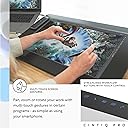
The Wacom Cintiq Pro 24 is a professional-grade 23.6-inch 4K touchscreen pen display featuring 8192 levels of pen pressure sensitivity, 99% Adobe RGB color accuracy, and advanced multi-touch controls. Designed for creative professionals, it offers optical bonding to eliminate parallax and includes exclusive trials of top creative software, making it the ultimate tool for digital artists seeking precision and vibrant color fidelity.


| ASIN | B07GHJ9LC5 |
| Active Surface Area | 20.55 x 11.57" |
| Additional Features | Multi-Touch Screen |
| Best Sellers Rank | #332 in Computer Graphics Tablets |
| Brand | Wacom |
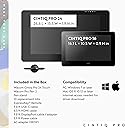
| Built-In Media | Wacom Cintiq Pro 24 Pen&Touch display, Wacom Pro Pen 2 w/ 4-color pen ring set, ExpressKeyโข Remote (with USB-A RF dongle and 30cm micro-USB to USB charger cable), Pen stand with 10 replacement nibs (6 standard, 4 felt) and nib removal tool, Pen holder, 180W AC adaptor, 1.8m power cable, 1.8m USB-C to USB-C cable , 3m DisplayPort to DisplayPort cable, 3m HDMI2.0 to HDMI2.0 cable, 3m standard USB-A โฆ |
| Color | Black |
| Compatible Devices | Desktop |
| Connectivity Technology | DisplayPort, HDMI , USB |
| Customer Reviews | 4.6 out of 5 stars 156 Reviews |
| Display Type | LCD |
| Global Trade Identification Number | 00753218986962 |
| Item Dimensions L x W | 26.65"L x 15.5"W |
| Item Type Name | Wacom Cintiq Pro 24 Pen and Touch, 24-in Pend Display Tablet, Black (DTH2420K0) |
| Item Weight | 15.87 Pounds |
| Manufacturer | Wacom Technology Corporation |
| Mfr Part Number | DTH2420K0 |
| Model Name | Cintiq Pro |
| Model Number | DTH2420K0 |
| Native Resolution | 3840x2160 |
| Operating System | Windows |
| Pressure Sensitivity | 8192 Levels |
| Screen Size | 23.6 Inches |
| Special Feature | Multi-Touch Screen |
| Specific Uses For Product | business, personal |
| Target Audience | Teacher |
| UPC | 753218986962 |
| Warranty Description | 1 year |
B**L
An Amazing Tablet
I've wanted this item for some time now, and it was definitely worth the wait! It truly is a digital artist's dream. There has been some little learning curve, as there is with all new tech. Set up and use with my computer has been flawless. The only issues I've had with it are the touch surface occasionally picks up on my hand impressions, and the touch rotation function is either not very intuitive, or I need to practice much more. Overall, extremely impressed!
P**Z
Love the Quality
I went from intuos pro M to cintiq pro touch 24... simply amazing. I see myself using this product for ever.
T**S
Wonderful Drawing Experience
I do background layout/design and painting for the animation industry. I have used Wacom products since 2003 (starting with their drawing tablets), but this is the best one yet. The 24" display really let's me see details clearly, and the pen response is wonderful. I love drawing and painting on this device. For some reason, I did have trouble registering the device (Setup Wizard kept skipping the registration phase and the Wacom site would not accept the SN#), but Wacom tech support was very responsive and helpful in resolving this issue.
R**R
Upgrade from my previous Wacom Cintiq
I love the more horizontal framework. There are more bells and whistles than I can count but it's not too complicated for my simple drawing use. I love the smooth lines I can draw on it. My older Cintiq 21UX was getting long in the tooth. It wasn't as responsive any more. The catalyst for replacing it was I needed to upgrade my Mac and the newer operating system wouldn't support the older driver for my previous Cintiq. I'm still having issues with the touch screen. I've got a glove to keep the heel of my drawing hand from registering a touch but it doesn't always work. I haven't found a way to turn down the sensitivity of the touch. For now I've turned off the touch feature. In hindsight I wouldn't have paid the extra $500 for the touch capability. I'm not giving up though. I think I'll be able to manage it as time goes by.
B**.
For that price, it certainly should be a drawing luxury!
Oh boy, if you're willing to spend your life savings, this massive thing will suck all that money right up!!! I just saved up enough money to burn on this. Transitioning from a Wacom Intuos Art drawing tablet, this is my first time owning a Wacom pen display tablet and it doesn't disappoint so far. I'm a freelance artist and I've been using this for a week and half and it is such a luxury to draw on with the matte glass display. The device itself looks sleek and huge and it should for that outstanding price range. However, with all expensive things comes with disadvantages. Pros: -Display: That premium 4k display that Wacom keeps boasting about is such a pleasure to look at. The brilliant colors are great to look at compared to the screen on my 2015 MacBook Pro which looks a little washed out. With the matte screen, dust easily comes off with the included microfiber cleaning cloth. -Pro Pen 2: I look at YouTube videos comparing Pro Pen and Pro Pen 2 and honestly they appear to perform the same in pressure sensitivity levels. But the pen itself performs outstandingly well with 8,192 pressure levels and glides smoothly on the screen. The greatest thing is that the pen is battery less so no charging required. Comparing the nibs of Pro Pen 2 with the pen that came with the Intuos, I barely have to change the nib. With the Intuos pen, I often find myself changing it every 2 weeks. Perhaps, maybe I press too hard? Anyway, thumbs up for Pro Pen 2! Oh, and make sure to calibrate your pen first in Wacom's desktop center before using it. Express Key Remote: Yes, they include the remote with the 24"/32" models. However, since it works on usb wireless technology, it'll require the RF dongle. I ran into a snag with this when I first pulled the remote out of the box. I kept searching for the dongle but to no avail until I opened the back compartment of the Cintiq. It turns out Wacom already installs the RF usb dongle into the Cintiq pro, at least with my model. I don't know if they do it with all models. I'm using the remote quite more for shortcuts than my keyboard which I like. Multi-Touch: This sort of goes both ways. This feature is great to have when zooming in to look at your artwork and scrolling through pages, however the palm rejection is left to be desired. Cons: Here's where things start to get awry Multi-Touch: It's good to have but palm rejection is terrible. You'll need to turn the feature off when drawing. I had an issue when I left the touch feature on and when I started drawing, my lines started to squiggle out of control. Also, zooming and dragging windows is a bit lagging. Wacom's multi-touch gestures are not great so for me its guess and play. That is what I think they charge more for this model is because of the touch feature. For those who like having touch feature, beware of these issues. For those who hate it, this model is not with the $2,499. Get the non-touch model! Drivers: Ok, this can get a little funky for those who are new like me to Wacom tablets. I see on YouTube that Wacom Drivers are not so intuitive and hard to navigate. I agree on difficulty in navigating Wacom's Desktop Center and it is sooo hard to just figuring out how to create shortcuts on the remote, and setting up my pen. I often had to watch YouTube videos for instruction references. It just takes time to getting used to. Pricing: Holy Cow, is it expensive!!! This model is not worth it if you're not a fan of the multi-touch. Just get the non-touch model and save another $1,000 at least of right now. Accessories: This will put a hole in your wallet if you want to go the extra length and buy the new Cintiq Ergo stand and the Cintiq Pro Engine (PC Module). The PC Module I can understand that it could be expensive because you're paying for an actual computer. But for an additional $500 for the Ergo Stand, I rather look for a compatible stand at a more affordable price. Overall, this is a fantastic ultimate drawing tool for artists and I can't wait to start drawing background scenes and manga on this. Originally, I was going to go for the Huion KAMVAS GT-221 Pro 21.5 inch HD Pen Display but I found that although its a good 21" display, it still has HD res. Meaning with a bigger display, the amount of pixels contained in HD is stretched out to fit the screen but at a cost that the screen is more blurry and not as sharp. Also I heard that the Huion tablets has the same issue of squiggly lines like the older Cintiq models. Otherwise, I give this four stars and definitely recommend it to those who are serious in digital drawing.
A**R
Expensive but worth it!
Love this tablet. Iโm so glad I finally was able to make the jump and purchase it. After reading several reviews, I was worried about the pain rejection. It definitely could be better, but I just bought some drawing gloves and they solved my issue right away. The portable express key remote is fantastic for programming my own hotkeys per program, and charges fast. The screen is beautiful, and I got the flex arm so I can move it around freely. Definitely worth the buy. Art is so much more fun now!!
C**S
Donโt skimp on the stand!
Great upgrade from Cintiq 16. It is big and heavy. Buy one of the WACOM stands and save yourself the headache of a wobbly drawing experience. I use a Stream Deck XL and the Wacom remote so the touchscreen isnโt a dealbreaker for me but has been convenient in some scenarios.
M**W
Unacceptable Design Flaw
I purchased this Wacom Cintiq Pro 24 pen & touch 3 years ago. It was an expensive purchase for me at the time at 2700$ but I justified it assuming I would use it for many years. Fast forward 3 years later to a few days ago: The tablet would not power on when I press the power button. I lift it up to see if it's unplugged and heat a rattling coming from within. I open it up to see the on/off switch has popped off the circuit board. Apparently it sits at a right angle to where you press the button, and if not well soldered and can simply pop off from routine use. So I contact Wacom support and they offer to repair it for 1500$! Who in their right mind would pay that? If it pops off the day I receive it back, am I to pay another 1500? Then I take it to a local repair shop, and they say due to how it's designed, they're worried trying to resolder it back on might melt the switch. So that's not a great option. This experience has been vexing to say the least. A 3 year lifetime for a 2700$ drawing tablet is simply unacceptable and frankly pathetic. I have left 1 star for all features as the thing won't power on to experience them. And customer support has not been very supportive to this customer.
A**R
The Apex of tablets
Save for this. It is, without a doubt, the best tablet I've used. I went to school for tra-digital animation and have had the chance to try many other students tablets and then I come back to this one and it just has that polish that you won't find anywhere else. I own a Wacom-16 and while its a solid product, I always was thinking I'd like it to be just a bit bigger. The 24 solves that while looking sharper with 4k and the glass panel feels great. If you are palm heavy on the canvas like me you'll need a drawing glove as my sweaty paws like to stick. I wouldn't have it any other way though, my 16 has scratches like crazy after just a few months of use and yet my 24 pro has not even a blemish a year later. Also, the 24 is big. I almost went in for a 30"+ but my god I'm happy I didn't cause this beast barely fits in my setup with another monitor. This thing is like 27" across, wider than most people use for their everyday computer monitor. You'll need their stand too, the Ergotron arms are mixed reviews and getting the Wacom branded stand was without a doubt the best purchase I've ever made alongside this tablet.
T**D
Worth the money...
If you can afford this - or do what I did and finance via Amazon over 12 months with no interest - this is a great product. Yes, the touch screen is, well, very touchy. I wear the glove when I plan on using it. I never wore the glove previously. I have owned the Cintiq 16 and the Huion GT-191v2 previously. Both are great tablets - although the Huion's quality re drawing smoothly and its color reproduction is definitely in step with its low cost (but a perfect beginners tool). The Cintiq 16 just wasn't as accurate/smooth for drawing as this 24 Pro and, the space was way too tight I found after using for a while. Again though, the Cintiq 16 is fine quality wise - its just too small I found.
R**K
A true creatives professional piece digital art drawing painting master piece.
Best graphics display tablet I have used. Priceless. It is just so good.
S**U
Wacom Cintiq 24 pro after 4 years now with dark spots
I've only started noticing that the edges of my display is starting to have these dark spots. After turning it off for 2 days it would disappear but leave it on long enough it would return at the exact same spot!
C**A
Great shopping experience
I bought this product for my daughter, and it's an amazing product and your service is great and professional! Thanks for giving us the perfect experience on your website!
Trustpilot
3 weeks ago
5 days ago