
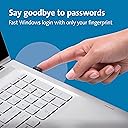



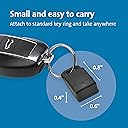
Kensington VeriMark Gen1 USB-A Fingerprint Key Reader - Windows Hello, Anti-Spoofing (K67977WW)
Product ID: 82585113
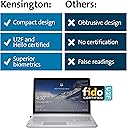
⚡FIDO U2F certified 2FA
🔒256-bit AES encryption
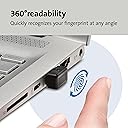
🖐️360° fingerprint readability
Desertcart purchases this item on your behalf and handles shipping, customs, and support to Taiwan.
🔐 Elevate your security game—because your digital identity deserves VIP treatment.
The Kensington VeriMark Gen1 USB-A Fingerprint Key Reader offers advanced biometric authentication with 360° fingerprint recognition and industry-leading anti-spoofing protection. Compatible with Windows Hello and FIDO U2F, it supports multi-user access and encrypts biometric data with 256-bit AES, ensuring secure, password-free logins and robust cloud account protection.


| Best Sellers Rank | #77 in Security & Surveillance Biometrics |
| Customer Reviews | 4.0 out of 5 stars 3,075 Reviews |
N**R
Plug-and-Play in Windows 10 and Works with LastPass Premium
It does what it says it does. It adds fingerprint reading functionality to your Windows 10 computer. *Works with Windows 10. *Works with LastPass Premium *It does not act as a password storage device itself. It has no other function except to add fingerprint reading functionality to your computer. TIP #1: When you install it into your computer, wait. You may have to wait several minutes for the system to register it and set it up. Then, go to your SETTINGS > ACCOUNTS > SIGN IN OPTIONS. There you will see Windows Hello. If the fingerprint reader has been fully recognized, you should see an option there to add fingerprints. If it doesn't work after about 5 minutes, try rebooting your computer, wait about 10 minutes, then try again. I attached a picture of where you should see Windows Hello. TIP #2: For LastPass Premium, go to OPEN MY VAULT. In that screen, lower left, open ACCOUNT SETTINGS. Pick MULTIFACTOR OPTIONS from the top row. Then scroll down and you should see the image I have attached to this review. Click on the little pencil. Change the NO to YES to activate fingerprint reading. Click UPDATE, enter your password, then it should ask you to scan your fingerprint. Voila! EDIT - UPDATE ON LASTPASS (7/2019) - I recently had to set it up again and this time LastPass indicated a "browser extension is missing for binary support" and I needed to download it. I did and it basically installs LastPass software on your machine. I see no harm. You have to close your browser(s) and open it again, then follow the instructions I give in the paragraph above. If it doesn't work the first time, don't panic. Give it another shot. Hope that helps!
C**N
I can’t speak for longevity, yet…
Received this today for my new laptop. I bought the 16” ASUS VivoBook with the Ryzen 7 top-tier CPU for $399 and the CPU is legit worth every penny, but the downside to the laptop is it doesn’t have a 144Hz display, fingerprint reader, or backlit keyboard. Seeing how cheap this was compared to other hardware I was hesitant, but Kensington is a brand I trust so I took the leap. It installed the needed drivers in Windows 11 Pro immediately on insertion and within two minutes I had it programmed and working for Windows Hello login, Microsoft 365, and OneDrive Personal Drive. Kensington pulled through. I am using it in the USB 2.0 port on the left side of the laptop and when it’s ready to read, it engages the blue light letting you know it’s ready to scan, then turns off as soon as the biometrics pass. It works quickly, even with 2.0 (lower power, why I chose it), and the driver it uses from Windows works well. I didn’t even get a hit for a second/better driver with Iobit DriverBooster Pro, so I am pleased Kensington delivered. It came rattling in the box, which I very much disliked, but it’s a solid component that works well. I recommend. I can’t speak for its longevity, yet, but I will if anything negative happens. No news is good news. Cheers!
W**J
Holy moly, this was not easy to set up
First off, it works. It's fast, and it allows me to not have to type a PIN every time I want to use my desktop. I am using a USB extension so it sits on top of my desk. Super convenient. However, set up was not fun, to say the least. Not to sound like a loser, but I'm a computer science major, so when I say it wasn't easy, it wasn't easy. I did all of the basic stuff like installing the drivers and making sure it was plugged into the board directly. Their directions for installing the drivers are actually really good. My main issue was that Windows Hello was not working. I kept getting the message: "This option is currently unavailable." First thing I checked was if biometrics was enabled. If you are having issues, this is probably why. Go to the local group policy editor and allow the use of biometrics. This still didn't fix my issue with Windows Hello. I made my way to the event viewer, where I found out that the VeriMark was actually working, as it was posting events under biometrics. So it wasn't a hardware issue. After browsing random forums for a while, I found a Reddit thread about WHfB not allowing biometrics. Turns out, I had to enable biometrics not only under the biometrics section, but under WHfB. I assume that because my OS is Win11 Pro, WHfB is used, which means I had to go back the to local group policy editor and disable certificate use for authentication, and enable biometrics. Based on other reviews, it seems this is a niche case, but if you are having similar issues, try what I said.
D**S
Can't seem to get it to work on Windows 11, support useless to date...
So I bought this device when I had a windows 10 device. They worked well, no issues. Now on Windows 11, can't get the device to start. I then went to their support pages, found a message (that is still up as of 1/1/2022...) "We are currently testing our software compatibility with Windows 11. Please check back for updates." So I waited a couple months to see if they had worked it out... nothing. So I opened a ticket on 12/17. Got a surprisingly quick reply that indicated the device works on Windows 11 and to follow the manual device installation. Well that didn't work. So I wrote back indicating after several tries, still wouldn't work. They replied again quickly on 12/20/21: "We regret for the inconvenience with Verimark Fingerprint key on Windows 11. We would like to inform you that we will escalate this issue to appropriate department and once we got an update we will get back to you. We appreciate your time and patience." Now on 12/31, I get another update: " We have not heard from you concerning your request for support in the last 14 days since we sent you a response. Consequently, we have changed the status of your request to SOLVED." - with further instructions to re-open the ticket... And of course the "we are testing message" is still on their site as mentioned above. Given built-in finger print readers work with Windows 11, this seems to be a ridiculous scenario with Kensington. But if true, avoid Kensington Verimark Fingerprint reader until they get their driver figured out. If in fact you have it working on Windows 11, feel free to let me know... I like pins as much as the next guy, but as always I prefer to give me windows machines the finger! :)
T**L
Works 100% with windows hello/ 1password 7.0
EXTREMELY FAST. Works great in windows 10. I had doubts because I come from apple side of hardware and I did not want to buy a new MBP with touchbar just to get fingerprint. I moved back to windows 10 and the grass is indeed greener over here! First thing on my new PC build was to get a fingerprint reader and this thing rocks! Works flawlessly on PC (never on an apple machine) - has never faulted once for me so far and works even with 2FA from google (you have to configure via google's menu settings). The unit does run warm/hot (but it only turns on when needed to use windows 10 hello unlocking). Otherwise it's off. You can tell from the blue light it emits when it's on. I keep it plugged in always and it's never a problem (the heat you only notice if you unplug and feel). How secure is this? I do not know it's as secure as windows hello. It works with 1password version 7 and you just need to authenticate with password first, then every subsequent use you can use the fingerprint. You do have to click the windows hello icon in 1password dialog menu in order to activate the fingerprint reader. This is just the way windows hello works. This is same way 1password does for apple hardware. First time you need to enter password then after sleep/re-opening of app, you don't need vault password. I got this key to use for unlocking my 1password. Worth the $50 alone! Note: you can assign multiple fingers - and also accepts family members finger prints per login account. This most likely is handled by windows 10 hello.
C**Y
Plug it in, Set it up, And it works!
I wanted to add biometric authentication to an older laptop. When I saw this item on sale during Black Friday, I took a chance and ordered it. As usual for Amazon where I live, the item arrived quickly and well packaged. After removing the keyring safety cap, I inserted the VeriMark key into an unused USB port and waited for Windows to download and install the necessary driver. Since I already had Windows Hello set up with a PIN, I simply needed to go to "Windows Settings->Sign-in options" (hint: go to Windows Settings and use the "Find a setting" search bar) set up the fingerprint reader. After that had been completed, I wanted to set up sites like Facebook and Google to use the VeriMark as a 2nd Factor authentication method (FIDO U2F). Try as I might, I could not get these sites to work with the VeriMark device. Since I am a Firefox user, I thought I should try Google Chrome. Low-and-behold, the device worked great with Chrome. After a quick search, I found an article that stated Firefox Quantum currently has U2F support disabled by default. A-ha! Hopefully, this will help others to fully enjoy this great device. Since I cannot post a link, perform a web search for "How to Navigate FIDO U2F in Firefox Quantum". While the FIDO U2F experience in Firefox is limited at the moment, turning it on is very simple. It only takes three steps. 1. Type about:config into the Firefox browser. 2. Search for “u2f”. 3. Make sure security.webauth.u2f is set to "true" to enable U2F support.
K**K
Good Device but expected MORE from Kensington
Works as advertised. Installs on Win10 21H2 and up and Win11 23H2 with no hassle or driver installation needed. Just requires Windows Hello setup as others mentioned. Seemed to work fine after initially adding multiple fingerprints, but the sensor seems oversensitive and also whenever my hands are damp after washing and drying the sensor seems to have an issue with this and often takes several tries before recognizing any of the index, middle, and ring fingers on my right hand. Many time Windows ends up requiring my PIN. It might be my fingerprints are harder for it to read because I have small hands but I have to tell you I am a mobile application and platform engineer and I test thousands of laptops and phones from all manufacturers and do not have this issue. My personal Macbook M1 Pro, Lenovo Thinkpad(s), and Samsung Z Fold and S21 and S23 phones don't have any issues at all when my hand is wet/absorbed water from prolonged exposure. They work every time regardless of the fact that I have to use biometrics to access these devices dozens of times a day. Not sure why this gadget is so finicky. So it's a decent device but you can probably save yourself a few bucks and buy a cheaper competitor's and it might even work better...
M**N
Integrates well with Windows 10, LastPass and Norton
The device installation was fairly straightforward. It makes use of Windows Hello and installs the driver for Windows Hello (in Windows 10) automatically. The installation took about 3 minutes. All features were activated without issue during the install process. However, documentation could be improved upon. Perhaps a video of the install process using Windows Hello... Because I use multiple applications to manage multiple websites and account types, I wanted to steer clear of trying to remember over 75 different passwords. I was able to easily record information for every website that allows me to properly secure content. I didn't need to waste lots of time typing within any application that does fingerprint scanning or password storage. Occasionally, I will encounter a website/location that forces me to manually enter information into the password or username field. However, this is extremely uncommon. Turning on the fingerprint scanner (done in the Multifactor authentication area) in LastPass is manually done. This allows new passwords to be created and then linked to your fingerprint within the LastPass software. I have created multiple accounts for myself without an issue. Norton has it's Vault area which acts in a similar vein to LastPass. I haven't had any major issues with either of these packages of software due to good software integration with Windows 10. I haven't needed any tech support. I can't verify how well troubleshooting is. However, I look at this as a big positive...after all, who wants to call tech support?
M**B
Excellent performance, not so useful FIDO U2F
Nothing has ever been so painless, this is truly plug-and-play: you plug it in a USB-A port and Windows instantly takes care of everything. 10 seconds later it's ready to work. At this point you'll just have to go to Windows Hello in your settings to register up to 10 fingers. In my experience, this sensor is about as fast and as reliable as the second Touch ID sensor from Apple (which is considered as a leading standard in fingerprint authentication). I haven't yet fully tested U2F. Look for it in a subsequent edit. EDIT >> I have now had the time to test U2F and there are a couple of things to know: * This doesn't work like a Yubikey for example. U2F in this, the same as for Windows Hello, is directly tied to the computer where the fingerprints and the 2-factor auth had been set up (in fact, as far as I understand this, it's Windows Hello itself that manages the U2F bit in conjunction with the reader). It is therefore not portable, no data whatsoever is stored on the actual sensor. You can't just take this dongle and plug it in an another computer to authenticate; it won't work. You can however set this up with multiple computers you own. For each one of these, you must run through the entire set up process and register a "new key" with your websites. If you were hoping to trike two birds with one stone using this (fingerprint scanning and portable U2F), you are out of luck. This severely cuts the usefulness of U2F support as, generally, your own computers will be considered trusted devices for 2FA and will never be asked to use codes or keys. * U2F support just came to Edge in the 1809 Windows 10 update and it's still flaky. It's outright unsupported on Firefox (unless if you dig in the config page and manually enable it, and even then it's not reliable). If you use Chrome, you're good to go. END OF EDIT <<
A**Z
Not Working :(
Not Working :(
A**B
Spodziewałem się lepszego działania
Słabo działa, szczególnie za te pieniądze, często i tak muszę wpisywać pin, ocena 3 jest i tak szczodra.
B**M
Utmärkt installation och funktion
Denna fingeravtrycksläsare monterade jag på en stationär dator. Fingerskannern igenkänndes omedelbart av Windows 11 och den fungerar alldeles utmärkt. Rekommenderas absolut med högsta betyg.
A**N
Funciona bien PERO
La verdad que el precio de 50/60 me parece excesivo aunque sea por el prestigio de la marca, a mi me valio 20 reacondicionado. En mi PC de sobremesa me paso lo que a muchos y es que no me lo detectaba, me descargue el controlador de la web oficial, actualice windows, reinice y ya me lo detecto perfectamente.
Trustpilot
3 weeks ago
2 months ago