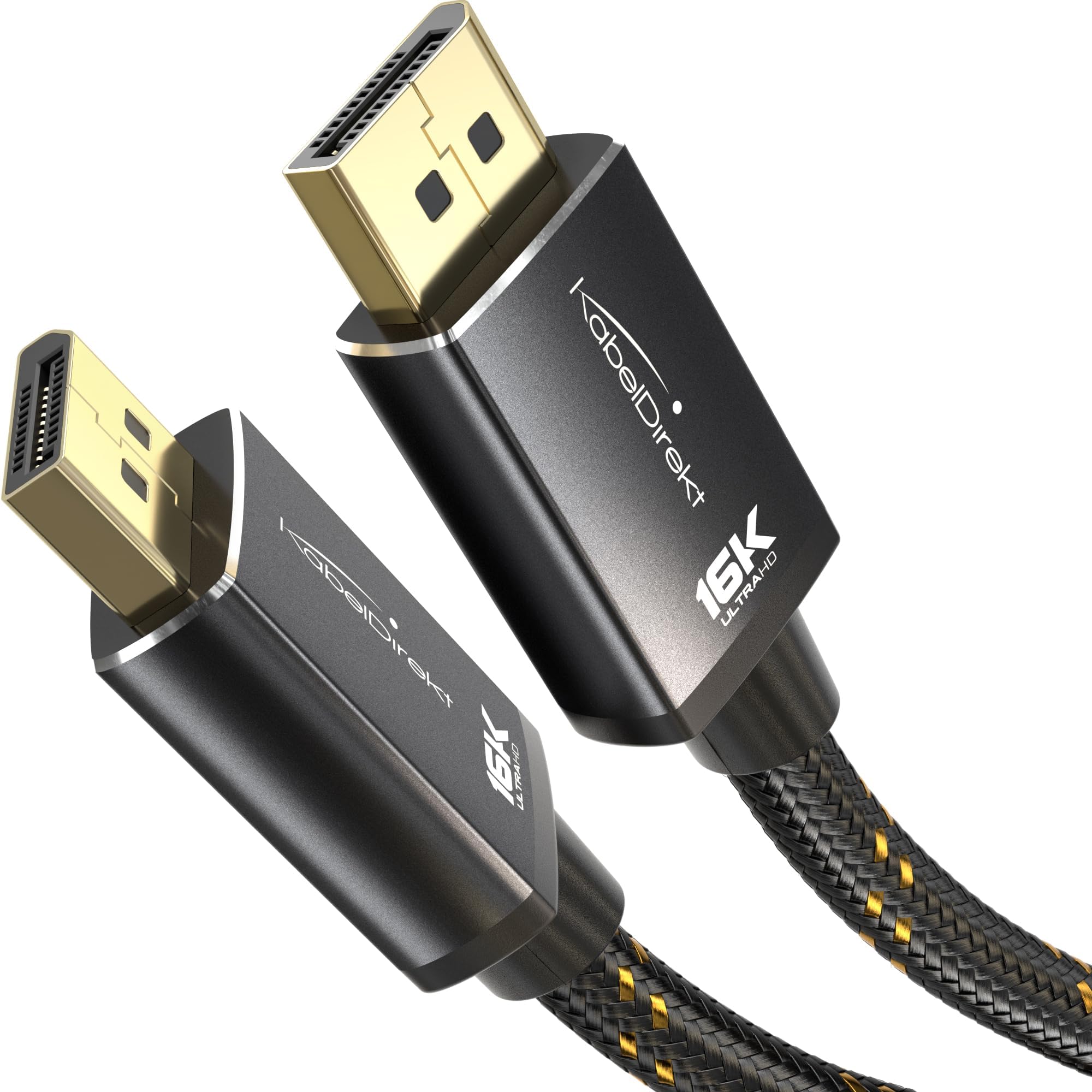
🎮 Level up your display game with KabelDirekt’s unstoppable 16K powerhouse cable!
The KabelDirekt DisplayPort 2.1 cable delivers an industry-leading 80Gbps bandwidth supporting ultra-high resolutions up to 16K at 60Hz. Built with break-proof metal connectors and a durable nylon braid, it ensures robust, long-lasting performance. Designed for gamers and professionals alike, it supports FreeSync/G-Sync for smooth frame rates and is fully VESA-compliant to protect your GPU. At 16ft, it offers flexible, clutter-free connectivity for high-end setups.


| ASIN | B0CYQ7317L |
| Best Sellers Rank | #1,693 in HDMI Cables |
| Brand | KabelDirekt |
| Cable Type | Display Port |
| Color | Black/Silver |
| Compatible Devices | Personal Computer |
| Compatible Phone Models | No Compatible Phone Models |
| Connector Gender | Male-to-Male |
| Connector Type | DisplayPort |
| Data Transfer Rate | 80 Gigabits Per Second |
| Date First Available | March 21, 2024 |
| Frequency | 240 Hz |
| Global Trade Identification Number | 04262421061008 |
| Indoor/Outdoor Usage | Indoor, Outdoor |
| Item Weight | 14 ounces |
| Item model number | 2331 |
| Manufacturer | KabelDirekt |
| Model Name | KabelDirekt – DisplayPort 2.1 Cable/16K DP 2.1 Cable – 16ft – Nylon braiding + Break-proof metal connectors, DP80 with 80Gbps for gaming PC/monitor, FreeSync/G-Sync, for 16K@60Hz, 8K@120Hz, 4K@240Hz |
| Number of Items | 1 |
| Number of Pins | 20 |
| Product Dimensions | 196.85 x 0.83 x 0.47 inches |
| Shape | Round |
| Special Feature | Hohe Geschwindigkeit |
| Specification Met | ETL |
| Unit Count | 1.0 Count |
A**D
Apparently the only long Displayport 2.0 cable that will not destroy your GPU
So I went on a quest to try to find a VESA certified Displayport 2.0 cable, which didn't exist, and then I went looking for merely a Displayport cable that is 2.0 and doesn't have the dreaded 20th pin that fries GPUs. The only reason you could ever need or want a DP 2.0 cable is because you have a fancy-pants GPU capable of using the 2.0 bandwidth, and if you're wondering why there's only one cable out there in June of 2023 that is both 1. Long and 2. Will not fry your GPU, your guess is as good as mine! But if you just got a fancy 4090 and want to stop looking, skip the reading below, order this, and don't look back! Some education about cables: Contrary to what a lot of the advertisements online suggest, and what most of the staff at Best Buy tell you, a high end video cable isn't about picture quality. It's about framerate and movement quality. This is also known as the "refresh rate" in your display settings, and it usually runs anywhere between 60 and 144 Hz for monitors. If you were watching a film on a 1080p projector, a ten year old HDMI cable that costs a couple bucks from Home Depot will look amazing (because it's data: it either arrives, or it doesn't). The frame rate in film is 24 frames per second, so not a lot of data, and absolutely no reason to buy an expensive gold plated one for $50-100 for that purpose. If you are gaming, however, and want 90-200fps, then the bandwidth of your cable becomes a huge problem. Although it's technically possible for a GPU to lower the quality to accommodate, what will actually happen is glitches and stutters where the picture blacks out and reappears because there isn't enough bandwidth in the cable. The exact same problem arises if you a creative professional, or otherwise have need for multiple 4k or 5k monitors--use the latest DP cable, or you could have blackouts, depending on how high you like your refresh rate. For video editing or animating, that's how often the image on screen refreshes, and a higher refresh rate is in fact quite nice, as you don't want film-level FPS while scrubbing through footage or keyframes or whatever. At least, I don't. I unfortunately haven't been able to test this with a double 4k monitor, as I am a gamer, but I did get rid of the blackouts I was having by switching from an HDMI to this cable when gaming at a 144mhz refresh rate with 100+ fps. The only problem people are complaining about in the reviews seems to be that the cable end itself is a bit bulkier than normal, which unfortunately, tends to be the reality for the longer (and higher bandwidth) cables because they need a lot more insulation to avoid signal quality degradation. If you're used to running cables 15-20 feet between a computer and a projector then you are used to these cable thicknesses already, but if you are not, you need to make sure you have some clearance around your port to plug in a bulky cable. If you are doomed to working in a tight space (this happened to me once with a projector) you have to pay a few more bucks to buy a more flexible 1 foot extension cable (which also has to be the same speed), or possibly break it while bending it. But if you are building high end workstations or theater setups, you should ideally be building in room for the bulkier cables. With this particular cable, you need about 2.5 inches of clearance from the port before the cable becomes bendable. That's about an inch more than you may be used to. I read that something like 2/3 of cables don't actually have the bandwidth they market online, and I don't have the tools to measure cable bandwidth. That said, as of this writing, there were no other cables with advertising that wasn't obviously misleading about the purpose of the 2.0 standard, and this was the only cable to reference that it was correctly structured to have 19 pins and not 20, so... yeah. Even if it was one star it would be your only choice. (Also I did look at it, and there is only 19 pins.) But I've run a lot of cables and this definitely has the feel of a quality, well insulated one. It is bulky for the same reason that the gigantic workstation you're running it from is bulky. For now they have the market cornered on long 2.0 DP cables. So love it or hate it, this one is it.
P**R
Good display port cable
Have been using this with a 4k monitor connected directly to GPU in my PC for over a year without any kind of problems. Works as expected and seems like good quality construction and materials.
J**H
Sturdy and Stable
These cables work like they should. I use a 15' one on my 1920x1200 60hz monitor. I've successfully daisychained this one to another monitor, same specs, with a 10' cable between them. My computer did sometimes have issues detecting the monitors in this configuration, but I think it may have been pushing the limits. It usually worked fine and there were never dropouts once up and running. When directly connecting each monitor to the PC there are no issues whatsoever. I've added a 1080p 240hz monitor to my setup and am using a 10' cable on it -- there are no connectivity issues at all and it's operating at 240hz. I'm very happy with the quality of these KabelDirekt cables. They're sturdy and you can feel the quality. The ends have a satin finish and a locking mechanism. I've tried cheaper cables of similar lengths and had blackout issues. These are well worth the extra cost.
F**Y
Great Cable For Price!
Nice cable. Well built. Works great.
D**N
Quality you can see and feel...
This is one of the few DP cables on the market that is VESA certified. Love this cable Sad to see them leave this space. I genuinely wish them the best
A**R
Amazing for Windows 10...only.
I am a split user. MacOS and Windows10. I use one for professional use and one for gaming use. This cable offers amazing quality so long as you use Windows10. Using MacOS with latest update I am getting a pink screen tint image. No matter what Hz I set it too or color setting I adjust it too. When I use it in windows10 it works amazing at 144hz and handles the bandwidth via my matching frame-rate. For gaming its amazing but I cannot give it 5 stars due to the quirks with handshaking with MacOS systems. Ran tests native via GPU DP1.2 and 1.4 port and also running to a ViewSonic 144hz 1080p with a DP 1.2 port. The MacBook Pro was using a Thunderbolt3 Elgato Dock with a DP 1.2 port. Mind you I use this cable on a Windows10 machine. Works just fine. A boot-camped MacBook Pro 16inch in MacOS native operating system, just a pink screen. The cable works however on a bootcamp'd MBP which is an Apple product. It is so weird. Works on a MacBook Pro so long as your machine is bootcamp'd with Windows10. Will give you a pink screen if you use it with MacOS. Still love the build quality of the cable and the durable pin snap button.
J**R
New, functions great
T**T
Vesa certified. They work with 4k 144Hz display
The price is good. The construction seems very solid, and I like the locking DP connectors. These cables are certified. Go to the vesa . org site, search, and you will see it. Many cables are not certified or not for the bandwidth/level you might expect. I drive an LG 27GN950-B 4k 144Hz monitor with that (with a 3080 card). It uses DSC (display stream compression, a feature of DP 1.4) to be able to push 10 bits 4k at 144Hz. Regular cables fail, these work. And they are not crazy expensive. I use a 6 feet version, so something to keep in mind. The longer the cable, the harder it is to keep the errors low enough to not have any problems. I have not tried to drive my monitor at 160Hz with this, as it's pointless for video games, and useless for using Windows. I saw many reports in forums of success with these cables and the monitor in overclock mode. I bought 3 more of these cables to drive a DP KVM switch for another computer (2 sources, one 1440 144HZ G-Sync monitor), and added a miniDP to DP from the same manufacturer as I was satisfied that they worked great. "Club 3D" cables are also good and certified if these are out of stock.
D**M
Been using it for some months, works perfectly and is one of the few true DP 2.0 (UHBR10) cables out there.. most people won't need it except for very high refresh rate 4k monitors and such, but overdoing it just to have the latest technology doesn't hurt, it's futureproof.
M**.
Lo compré para sustituir el cable que venía junto con mi monitor QHD de 27 pulgadas ya que era más delgado y más corto. Éste es más grueso y los conectores que van a los puertos de DisplayPort se mantienen muy firmes. Mi monitor tiene una tasa de refresh de 144Hz, utilizo FreeSync y la PC no tuvo ningún problema para detectar esas características. Me enteré de esta marca y cable por comentarios que leí sobre el pin 20, ya que dicho pin lleva corriente y se utiliza para energizar dispositivos sin necesidad de fuente externa. Si bien también han comentado que si tu tarjeta de video fue fabricado después del 2017, entonces no deberías tener problemas, creo que no está de más asegurarse que el fabricante del cable cumpla su certificación VESA, y KabelDirekt es uno de ellos
A**C
el cable funciona perfecto y la construccion en gral es buena. Las teminaciones de plug tambien. mi monitor funciona perfecto con este cable, a los 200hz que tiene.
M**T
Mükemmel bir icat tebrikler
M**D
Perfect as advertised
Trustpilot
2 months ago
2 weeks ago