
DOWNLOAD THE APP


Customer Services
Copyright © 2025 Desertcart Holdings Limited
DOWNLOAD THE APP

🔄 Switch Like a Pro, Stream Like a Boss
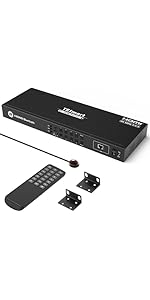
The TESmart 16×1 HDMI Switch is a powerhouse AV hub designed for professionals and tech-savvy millennials managing multiple 4K sources. Supporting up to 16 HDMI inputs with 4K@60Hz resolution and HDCP 2.2 compliance, it offers versatile control options including IR remote, RS-232, and LAN/IP commands. Its 1U 19-inch rack-mount design ensures seamless integration into professional setups, while smart features like auto-scan and hot swapping keep your workflow uninterrupted. Perfect for those who demand high performance and streamlined control in one sleek device.




| ASIN | B085S1CR6T |
| Batteries | 1 CR2 batteries required. |
| Best Sellers Rank | #212 in Audio & Video Selector Boxes |
| Date First Available | March 11, 2020 |
| Is Discontinued By Manufacturer | No |
| Item Weight | 3.53 pounds |
| Item model number | HSW1601A1U-USBK |
| Manufacturer | TESmart |
| Product Dimensions | 12 x 5.91 x 1.75 inches |
L**Y
Great HDMI switch with some gotchas that make it hard to configure the LAN control
I give this 5 stars for good functionality at a reasonable price, but there are several issues to be aware of. First, this functions well as advertised. It's an 8x1 HDMI switcher supporting HDCP 2.2 and 4K (3840 x 2160) @ 60Hz. Switching can be controlled by front panel buttons, IR remote, RS-232, or Ethernet/IP. I use these on TVs where I have many HDMI devices that I want to toggle between. I have used this with Google TV, BluRay, Ubiquiti ViewPort, Roku, and other types of devices. I primarily use the Ethernet/LAN/IP control capabilities. I have Lutron keypads set to select the TV input. Programming the Lutron Homeworks QS system to enable switching HDMI inputs is relatively simple. Here are the downsides to this device: - The RS-232 port is a 3-pin connector that must be wired to a 9-pin Female D-type RS-232 connector to use the port. It's not hard to do, but this does not connect to a standard RS-232 cable out of the box. You will need to make a custom cable if you want to use RS-232. The manufacturer should include a 3-pin to 9-pin Female D-Type RS-232 adapter. - The LAN/Ethernet port comes set to a static 192.128.1.10/24 IP address. It does not use DHCP. The IP address requires using a custom Windows utility to configure. The Windows system running the custom utility must either connect to the static 192.128.1.10 address or use the RS-232 port. The device does not have a Web browser interface. It listens for hex commands on the IP address port (default 5000) in the same format as on the RS-232 interface. There needs to be a way to configure the IP address without using a Windows PC. - There is no way to factory reset the device. If you set the IP address wrong and are unable to connect over IP, you must use the RS-232 port to reset the IP address. The device should have a factory reset button or button sequence. Aside from these negatives, which make setting up the device more complicated than necessary, these are great little HDMI switches. I'm about to install the 16-input version on my main living room display, where I frequently switch between multiple security camera views and different AV devices.
A**R
Automatic input detection and switching does not work
EDIT: I got a replacement from the manufacturer and auto-switch works correctly. Must have been a bad unit. Overaly very happy with this unit. Original review: This is one of the only 16-port HDMI switches on the market. Per the Amazon product page, it includes "Automatic input detection and switching." I take this to mean that when powering on a connected HDMI device, the switch will automatically change to that input. This does not work for me. It's also not clear whether the switch actually includes this feature or not. While the feature is listed on the Amazon page, the manufacturer's website only lists the time-based auto-scan feature. TESmart offers a download package that includes a PC Control app. This app has a button to turn this feature on an off. The included PDF describes this feature as: Auto input detect on: When plug new HDMI input source to the switch or power on the HDMI input source, the switch will automatically select the input port that is connected to this input source. When unplug or power off the HDMI input source, the switch will switch to the input port which is last plug in or last powered on HDMI input source. This is exactly what I want but it does not work even after using the app to enable it. I have the app set up correctly as I can change other settings such as the muting the input change beep. I can also use it to change inputs. I should note that these other settings do not appear to be retained through a power loss. Adding to the further confusion as to the existence of this feature, there is a second PDF included in the PC Control app download. It is just an API documentation on the RS232 and IP Control hex commands you can send to control the switch. This is a great thing to include but I couldn't help notice that the automatic input detection and switching is not listed in this document. I have emailed TESmart support and will update this review if they can help.
E**T
I'd give it less than one star if I could
What a colossal waste of my time. I have twelve devices (game consoles, computers) that can output HDMI at various resolutions and this thing fails miserably. This is advertised to accept "up to 3840x2160". Notice how a list of exact resolutions are not supplied in the specs? Well, while I have devices that output 1080p over HDMI (and those work fine with the switch of course) I have others that output various resolutions over HDMI. For example, the RetroTink (original) outputs 480P over HDMI. But, the switch does not like it. No display. It works fine when connected directly into my TV and it works fine when connected to a five dollar non powered switcher. I have an HDMI card for my Apple IIe. It outputs at 720x480. It doesn't like it. No display. WOrks fine on my TV directly or into the same cheap $5 switch. I have a Sofia2 on the Atari 800. It works, then it does not. I changed the resolution from 1280x960 to 1024x1200, 1366x960 as well. All of these resolutions work direct to the TV and guess where...again the cheap HDMI box. I went out of my way to disconnect everything from the multiple cheap boxes I have in order to clean things up and connect it all to this HDMI matrix...which is a job and it is not cheap. I really expected it all to work. Why would cheap HDMI boxes work but not this expensive matrix? What a waste and what a joke. Everything is connected back to the five dollar boxes now and this trash is going back immediately. Thanks for nothing.
M**G
Very easy set up, plug and play. One thing to note is if you have an Apple TV you may have to adjust your audio settings. Mine had to be changed to Dolby 5.1 or there was only music but no actual verbal dialog. Simple and easy fix. It’s very large, but comes with brackets to mount if that’s a problem for you. Even the ps3/ps4/ps5 all function smoothly with this setup, as they do tend to be the problem children. I hear the power adapters die off sometimes, but I haven’t had it long enough to know if that’s true. So far so good 🤞
P**R
This peace of equipment is incredibly useful for some one with a lot of game consoles, or other devices that use TVs or monitors.
T**S
Works wonderfully. Annoying that it always makes multiple switches before connecting to the device thats powered on & constantly beeping when doing so.
S**A
Waiting from family member review. Will update later
Trustpilot
2 months ago
2 weeks ago