
🚀 Elevate your desk game with seamless dual-display power and ultra-fast USB connectivity!
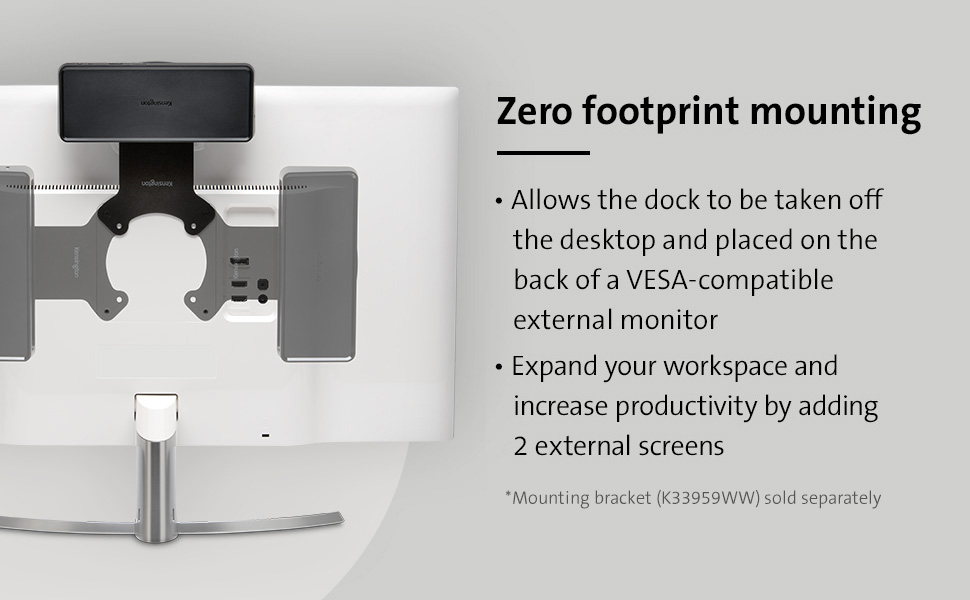
The Kensington USB 3.0 Dual Display Docking Station (K33997WW) is a versatile, universal dock compatible with USB-A laptops and Surface devices, offering dual HD video output via HDMI and DisplayPort, four USB 3.0 ports with 5Gbps transfer speeds, gigabit Ethernet, and audio jacks. Designed for professionals craving a clutter-free, reliable workspace, it supports MacBooks (M1-M4) with adapters, features VESA mount compatibility, and includes Kensington’s trusted 2-year warranty and lifetime tech support.


| ASIN | B01JV7FJN0 |
| Best Sellers Rank | #24,910 in Computers & Accessories ( See Top 100 in Computers & Accessories ) #1,105 in Laptop Docking Stations |
| Brand | Kensington |
| Color | Black |
| Customer Reviews | 4.0 4.0 out of 5 stars (125) |
| Date First Available | July 30, 2016 |
| Is Discontinued By Manufacturer | No |
| Item Dimensions LxWxH | 6.6 x 3.2 x 9.6 inches |
| Item Weight | 1.2 pounds |
| Item model number | K33997WW |
| Manufacturer | Kensington |
| Number of USB 2.0 Ports | 2 |
| Number of USB 3.0 Ports | 4 |
| Operating System | macOS, Windows |
| Product Dimensions | 6.6 x 3.2 x 9.6 inches |
| Series | SD3650 |
J**U
Great value for an USB docking station.
Working great with my MacBook Pro mid-2012. Had to install a DisplayLink app to get it to work, and the app seems a bit wonky, but for the cost (sub $100) this is a fantastic little hub. I've connected two hard-drives, one HDMI monitor and one DisplayPort monitor as well as wired ethernet and everything works smoothly. Super pleased.
S**T
When your Dell dock is trying too hard
I love this dock. It does precisely what i am needing from it, nothing more, nothing less. How did I get here? After 18 frustrating months of enduring a Dell WD19S "smart" dock, I was looking for an alternative solution. Among the Dell dock's various sins, it is apparently notorious for just disconnecting from laptop any time there's a power blip - and in our newly remote/hybrid work world, we seem to have power blips a lot more often since no one is routinely in the building. This prompts the Dell Latitude on Win 10 to disconnect and drop all dock-based USB connections, and subsequently put itself to sleep because it thinks it no longer has power; and I found was not reliable even when you awaken said Latitude (this i discovered the hard way, when my laptop - which i believed to be recharging - suddenly went into hibernate while I was building a campaign because it was at 5% battery). The HDMI ports were constantly swapping screens in the Win 10 interface, my USB peripherals would mysteriously drop. It's just trying too hard and not really succeeding. Solution: this dock by Kensington. VERY reasonably priced (I paid $85), has sufficient ports for what I'm supporting, doesn't drop my peripherals and doesn't send "sleep" commands to the OS when a power drop occurs - it just reconnects. Additionally, yes it does not provide 'charge' for the laptop, but i don't really want or need it to. The laptop has its own independent power supply (I keep it in clamshell mode behind my monitors). It just does the job it is supposed to do. If you need bells and whistles, there are other (significantly more expensive) alternatives, and mileage will vary. If you just need solid port replication and high def video (including legacy USB ports for your USB-C small form-factor laptops) with networking, this does the job and does it well. So glad I found this!
F**I
Okay but there’s better solutions
Works but really glitchy with my Surface Book 2 laptop. Almost always trouble when I plug a new device into it. Also not clear enough in the description that it won’t charge the laptop. Probably would not buy again.
B**D
Doesn’t power hard drive well.
All I’ve got in it is a keyboard, mouse, Ethernet, HDMI, and the laptop itself... all the things you would expect from a normal computer. I’m not even charging a phone. But as soon as I plug in a 1TB drive, I get the Windows connected/not connected sings every three seconds or so. I had to unplug the hard drive and plug it into the laptop itself—which to me defeats the purpose of having a docking station. Kensington, if you can’t make a docking station that powers a simple hard drive, either put less ports on it or increase the power.
L**M
Works with HP Pavilion
I can work efficiently now! During quarantine I have been hindered by not having multiple monitors. I have purchased 3 other devices/docks trying to extend to additional monitors. Finally found this dock. It is compatible with HP Pavilion laptops which seem to not be friendly to many other docks.
D**E
Great Product And Beats HP
If you have an HP laptop, don't buy the HP Docking station. Worthless. I bought this as a replacement, should have been my first choice. I had one minor problem hooking it up and Tech Support was great at getting me up and running. I just needed to buy one cable and now I am running two HP 25er monitors and my laptop monitor for a triple setup. Makes life so much easier when I'm trying to get work done.
C**D
Easy to setup and use
Drives my dual monitors flawlessly from my laptop. Easy to setup.
J**3
Great feature set for price
Arrived on time and as expected
A**.
Kensington USB 3.0 Docking Station - SD3650 USB 3.0 Dual Display Universal Laptop Docking Stat I tested my docking unit on my Dell Inspiron Laptop: **The setup was good and easy carry out. ** The supplied USB canle was connected to docking bay without issue. The other end of the USB fitted ok into my USB 3.0 port. **The 2 UDB ports at the back f the docking bay I used to connect my back lighted keyboard and mouse to these 2 ports. I use a keyboard and mouse instead of the laptop keyboard and mouse as I have poor sight. **Used the other USB ports on docking bay to add my 2 external disks. **Carried out a backup of laptop to the 2 external disks without issues. **I then added a USB stick onto the docking bay that was bootable (Paragon Hard Disk Manager). **The laptop booted ok with the USB stick on the docking .bay. **Whilst in the boot mode I could see the 2 external disks - good. Overall the docking bay worked as expected. Only issue I had with the docking bay was that the USB ports were to close to each other. Good value for money.
G**O
Semplicissima da "configurare" ( basta connettere il cavo USB 3.0 al PC ), si accende e .... finito! Attualmente la utilizzo con un notebook HP con windows 10. Nessun driver necessario ( riconosciuta al volo ) da installare. sono connessi due monitor esterni, un mouse, una tastiera e ho ancora ben 4 porte USB 3,0 libere! Fantastica!
T**R
I work as a software developer and having more than one screen is kind of a necessity and this was exactly what i needed. It has a low profile on my desk with loads of ports. It looks sleek and works well. No lag or connection issues. It's super handy just plugging in one cable to my laptop rather than 4. It was definitely worth the money
A**E
Generally works well. Occasionally the display port screen flickers, but the rest is great
L**Z
Actually I prefer the product exchange rather than refund. Since I need to spend extra £20 to post it. Amazon asked me to return the item and get the refund of both product and postage. But the unit price had been increased £31. That means I lost the price gap and my cash coupon. This absolutely is the disadvantage of shopping through internet. I can spend without extra money to exchange the defected items and no need to spend so much time with Amazon and seller if I bought from a local shop. Obvious water marks or scratches on the surface. HDMI display not connected when in use via docking station even installed the driver. One of the USB 2.0 port is not fit for a standard USB cable. I spent few days to search a non-China brand but this US brand also made in China. Very disappointed.
Trustpilot
2 months ago
1 day ago



