Desert Online General Trading LLC
Dubai, United Arab Emirates
Desert Online General Trading LLC
Dubai, United Arab Emirates


🎮 Elevate Your Entertainment Experience!
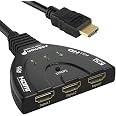
The Fosmon 4K HDMI Switch 3 in 1 Out allows you to connect up to three HDMI devices to your TV or projector, supporting the latest HDMI standards including 4K@30Hz and HDR. With automatic input switching and compatibility with a wide range of devices, this switcher is perfect for gamers and movie enthusiasts alike. Plus, it comes with a limited lifetime warranty for added confidence.


A**S
Unpack & install as per instructions
Performs well with no issues as expected, good quality product , easy to use, well designed & constructed at a reasonable price.Please note that automatic switching is only possible when the inputs are powered up one at a time then turned off & so on!
K**L
A good product
The connector works but there is a chance when connecting 2 different consoles to it that there is interference on the picture. However this only occured with 2 new consoles. The system works well now after shopping the equipment joined to it. Easy to install.
S**W
Does the job perfectly
This 3 port hdmi converter works perfectly for me. I had previously ordered a cheaper converter that looks very similar to this product due to the very good ratings it had, however when mine arrived it just wouldnt work so I returned it to Amazon. When this one arrived I could see why I had paid more for this. It was obviously made of superior materials and was a good quality product. What's more it worked first time around as it was supposed to. It will switch over automatically if there are no other hdmi units working but if there is one switched on it's simple just to select the input manually. It comes with a good length of connection cable allowing me to plug one end in the tv hdmi socket and secure the converter end to my TV stand with a little blutac to save 'fishing around for it if I need to switch manually. Nice product and I found it definitely worth that bit of extra cash.
B**A
It doesn’t detect ps4
Not good, I am giving it 3 starts because it worked with my tv box but it didn’t with my ps4, it detected it and after two seconds it literally stopped working and swapped to other channel and blacked out. Sending it back
N**T
Absolute Rubbish
Bought so that I could connect my fire stick and Nintendo switch to my tv. The switch was detected, but it would not detect my fire stick at all and none of the lights would come on for the fire stick irrespective of which port it’s plugged into. When plugged directly into my tv, the fire stick works perfectly, so I know it’s not the fire stick or tv. Will be returning, as does not do what it says in the description - rubbish.
R**Y
Simple and effective
Great piece of kit that does the job. I needed a HDMI splitter to plug both my Sky box and XBOX into my single ported TV after 1 month too long of switching cables manually. Plugs straight in to the tv HDMI port at one end and allows for up to 3 items to be plugged in the other end.The converter is sturdy, cables are short so no messy wires hanging around and with the push of a button you can flick between gadgets! Simple but effective piece of tech! Would highly recommend and was definitely reasonably priced and ordered/delivered without a hitch!
J**E
Perfect Switch
I have two setups, the first one for my work where I connect two laptops up to multiple monitors. I have used this et up for over 3 years and it is still going strong.I sometimes work from my home-office with a widescreen picture in picture monitor and needed a similar setup so I could switch between my private laptop, work laptop and xbox, The new setup is as good as the first and works perfectly thus reducing the constant cable changes I used to do.
P**R
Conflicted with Samsung smart sensing TV
This worked well most of the time but my Samsung TV has smart sensing technology that often overrides the Fosmon's ability to sense which device is being used. The primary issue was that the TV would 'see' my Samsung DVD player and switch it on (from cold) even though I was trying to use another device, a BT Youview box. So not a foolproof solution. In the end I turned off the Samsung's remote sensing technology. They say you can't, but you can.Unplug your TV from the wall for five minutes. Plug it back in but don't switch it on. On the remote, press the following sequence: Mute, Volume down, Channel down, Power on. Autosensing will be disabled. NB I don't know if this can be reversed!
Trustpilot
4 days ago
2 weeks ago
1 week ago
1 month ago