Desert Online General Trading LLC
Dubai, United Arab Emirates
Desert Online General Trading LLC
Dubai, United Arab Emirates


🎯 Lock in your edge, wherever you play!
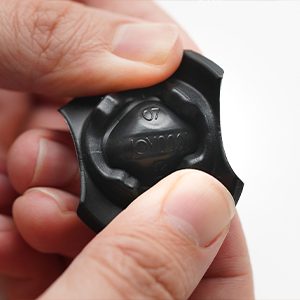
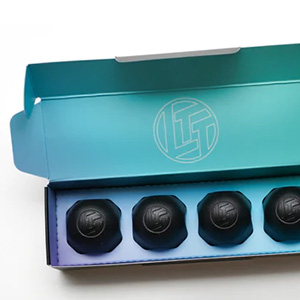
The LTT Sticklocks Joystick Thumb Stick Cap Stabilizer is a sleek, travel-friendly accessory designed to reduce horizontal joystick movement during transit. Made from 100% silicone, it fits most major controllers including Nintendo Switch Pro, PlayStation, Xbox, and Steam Deck. Lightweight and easy to install, this 4-pack ensures your gaming precision stays locked in, whether at home or on the move.



| Brand | LINUS TECH TIPS |
| Hardware Platform | PlayStation |
| Item Weight | 1.13 ounces |
| Package Dimensions | 5.31 x 1.61 x 0.94 inches |
| Color | Black |
| Manufacturer | Creator Warehouse |
| ASIN | B0C6X23JNG |
| Date First Available | June 2, 2023 |
J**O
work as intended
so really not sure what is up with people not trying hard enough and then coming back and saying these do not fit the ally. In fact, I did not actually try as hard and that got me surprised... these just fit in fine, even with a thin silicone protective case on. So, what you got to do when installing these is put them similarly to how they come in the box. Notice they do have flaps that point down and rest on a surface. Also notice that there are small tabs underneath those flaps inside the actual round dome-like shaped caps. These little tabs are the ones that should go *under* and around the edges of the joysticks, these are the ones providing the stabilizing grip. once you understand this deceptively simple and easy logic you're off. So its easy, grab one, with both hands, and using your fingers as if you were going to crumble or shred bread, place the center of the cap with the center of the joystick. Then make a gentle motion to lift the flaps up, and then with the thumb or other finger slightly press on the fat/rounded part of the joystick lock so that its somewhat upside down or inverted. Then with the other fingers, help the little tabs secure around the joystick and that's it. It will not necessarily click/snap loudly into place or anything, but it will be stable enough so that say, brushing your hand over or against them will prevent the joysticks from moving too much. To take them out use a fingernail or the tip of your finger to gently lift one flap, then press on the protector and wiggle the finger/fingers under the flaps to slide the tabs out of the edge of the joystick and it will release.Appreciate that four come in the box, so one pair is for my ally and the other one for my external controller I take from time to time.
K**N
Rog Ally X and Xbox Controller works great!
Took a few minute to understand how to put them on but once i did its pretty easy and quick and work great for my rog ally x when i want to throw it in a go bag
K**Y
Great for "on-the-go" gamers
Got this for my husband for Christmas, to go along with his Steam Deck. Had no clue what these things were used for, lol. But they shipped super fast and were not hard to put on. They are also not super hard, either. They are a little squishy but offer full protection for the joycons. Pricing wise, I think they're super affordable and it's a great value for what you're getting. If you have a gamer in the family that travels with their console - be sure to add this to their pack.
A**N
Great to just throw in a bag
In an effort to make what I carry as small as possible I needed a way to carry my controller that made it as small as possible.These work great, I can confidently throw the controller in my bag without worry.So putting them on is amazing and easy once you learn how they work. I am having trouble finding a graceful way of taking them off at the moment. But while they are on they work great.
B**R
Neat concept, meh execution
I wanted to love these, but I just can't... These are great as a concept. I would love added protection on the joysticks on my various handhelds. However, in reality they are difficult to get on even after watching the installation video, and I end up putting more stress on my joysticks trying to get the Sticklocks on then they would have ever experienced in my bag. Further, it's very easy to put these on wrong and it's hard to tell if they're actually on right. I'm using them on a Legion Go, so maybe handhelds with smaller joystick caps would be easier but for the Legion Go it's not great.
A**L
Best investment for handhelds
These are great I have put them on almost all my controllers but more importantly on my ROG ally, Switch and G-Cloud. I keep my portable consoles in cases while not using them and the stick locks remove the worry of the built in sticks getting damaged while the case rests a certain way. I also use these on my spare console controllers and these keep the sticks from getting jostled around the storage bin.They are fairly easy to put on and remove and low profile enough that don’t interfere with the cases.
K**O
perfect for the Lenovo Legion Go
I store my Lenovo Legion Go in a different case than the one It came with and I store it with my controllers detached. these are perfect and I dont have to worry about the sticks being compressed while travelling.
T**T
Hard to install on some controllers, feels like you are damaging controllet
I bought these to try out on my Xbox controllers and they worked fine, pretty simple to install except for some edge cases where the thing would just not grip onto my controller. That's where the issue is, I tried to use these on other controllers, and it felt like I was going to damage the joysticks. For example, I wanted to use it on my ROG ALLY and it does not fit snuggly, when I finally got them to fit, I couldn't help but feel that the damage I was saving the joysticks was being omitted by the simple attempt of getting them on.
Trustpilot
3 days ago
2 months ago