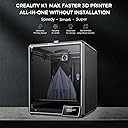
If I were a fresh-faced newbie to the world of 3D printing, this would be a great printer to start out with. This is an excellent printer for not just the price, but for a person who is new to 3D printing, or someone more experienced but wanting a secondary daily driver. The ease of use and the quality of the prints is comparable to many more expensive printers. I'd not think twice about purchasing another if I end up needing another printer. I've owned four printers by different manufacturers since roughly 2015-ish. Being on a budget, I went with printers marketed towards consumers and gradually learned about the use, updating and sometimes repairs, of printers. I joined various Facebook groups to improve my knowledge and experience. I purchased a Creality Ender-2, the ancestor of this model, back in 2019(?). It was a little intimidating to assemble, but the instructions and a few Youtube videos helped me and I was up and running after an hour or two. The Ender-2 was a tinkerers dream. I did upgrades and replacements for various components over time. It served me well. The biggest changes were replacing the cooling fans and the factory board. Those particular upgrades were to make the printer quieter. I didn't know back then that the loud fans it came with were required to move an adequate amount of air for cooling. The silent fans available then (and now) couldn't do the job adequately. Anyway, I replaced the hot end cooling fan with a silent fan, and had annoying clogs from time to time. But hey, the printer was quiet, LOL! The old board couldn't support drivers that would have silenced the stepper motors. The replacement board helped make the printer whisper quiet. But recently the controller board suffered a destructive short (very likely my fault). I was going to replace the board, but dreaded the work of compiling the firmware that it would have required to operate the printer correctly and safely. (I'm not the brightest guy and compiling firmware was a frustrating process). At about the same time, I started hearing about the Ender-2 Pro, an updated model based on the original design. I started investigating. Of particular note were all the design upgrades. All the old flaws of the original Ender-2 were addressed. They made the new model much more compact and portable. The reviews for it were good. The price for this printer was about the same as what I'd paid for the Ender-2. My overall positive experience with the Creality brand, plus what I learned from researching this new printer convinced me to buy it. When it arrived, I was delighted to see that it was like the first time I'd purchased a printer made by Creality. It had all the little extras and was even better packed than the first time. It was easier and faster to assemble than its ancestor. Now for the fly in the pudding. It initially worked great. I used the test g-code file to do an initially test run print and the printer was great. I use Ideamaker for my slicer software as it has more options for fine tuning slicer profiles. I modified an existing profile for the Ender 2 to work with the Ender 2-Pro. It worked flawlessly for a couple of days, then it started throwing out runaway thermal warnings. I'm glad to say that the printer did exactly what it was supposed to do. It warned me with a loud audio tone and shut down all the heaters to prevent a possible fire. That is a safety feature that wasn't common with printers but is becoming more widespread. In my opinion, it is an absolute must for safety. The frustrating thing was that I couldn't figure out what was causing it. I tried to find the answer at the new Facebook group for this model of printer. I did a lot of googling. I asked here on Amazon if any other customers had the same problem and had a solution. I was in a hurry to get back to printing. I didn't want to start blindly replacing stock parts so soon after buying this printer without knowing what the problem was. Happily Amazon let me return the printer without hassle. At the same time I opted to get a replacement at no extra charge. I know that virtually 100% of anything made and built for retail use has a lemon or two that slips past quality control. I've run into it in everything from no-name companies to big brand names. It is an unescapable fact of life. Creality is no exception. After I'd already returned the first printer and received its replacement a representative from Creality reached out to me. Finding out that someone from Creality actively watches the reviews here means they care about the customer experience and satisfaction. I'm impressed by that simple gesture and it reinforces my decision to stick with Creality. The replacement was delivered fast. It was brand new, factory sealed, and was quickly was assembled and running. Everything worked and the test print turned out flawlessly. The printer has been working almost non-stop since. I'm planning on keeping it bone stock for as long as possible. Adding third party parts can add new features and refinements, but for now I'm not interested modifying what works just fine. Well wait. One thing I immediately replaced were the bed springs. The factory springs seem to be a weakness in Creality's printers but are easily and quickly replaced. I used heavy duty yellow springs cited frequently in 3D printing groups and reviews. Those can be found for sale here and elsewhere. They are far more stiff and will not easily deflect like the originals. (I've been hearing about people using silicone spacers but I've not tried that yet). Now I don't have to re-level the bed very often. It helps that I'm using the included removable magnetic bed sheet. When I go to take off finished prints I remove the sheet and I can simply peel them off. Then I put the sheet back on. No muss, no fuss. The worst thing I can say about it is that it has a droning sound that is noticeable. The best comparison I can make is that it sounds like an average microwave humming. Not deafening or excessively loud, but enough to be noticed if it is in the same room with you. It is mostly due to the cooling fans and possibly the controller board. The factory control board that the printer came with might not have the updated firmware drivers that could silence the stepper motors. There were two slightly different controller boards that were used with this model. One of them can have the firmware updated but the other can't. In my case, I got a board that can't be updated. There are different controller boards sold by Creality, Big Tree Tech, etc, that can replace the stock board, but I'm not bothered by the printer noise. As for the fans, that is really inescapable. There doesn't seem to be silent fans in the same size range that can do the job the loud fans do. If the sounds are too much, you can move the printer to another room and close the door. The printer works without complaint. It has been reliable and easy to use. The updated design has made it truly portable. When I've traveled with it, I only had to double check the bed to make sure it was level, then started printing. I can print a bit faster now than I could with the older printer. I've been able to print a multipart four foot/120 centimeter Statue of Liberty in under a month. I think it would have taken at least a month and a half to do the same thing with my previous printer. Aside from the initial hiccup with the faulty first printer, I've not had another problem with the Ender-2 Pro. I wouldn't hesitate for an instant to buy another one. For my needs, it is more than up to the job.