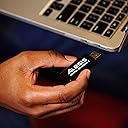
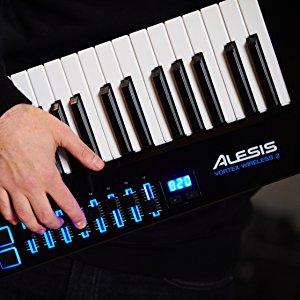
I have a couple of complaints... But all things considered, it's still a wireless MIDI controller keytar. Though it's not perfect, many things can be forgiven with such a unique product. It's one of my favorite purchases and I would recommend it to anyone who wants a 3-octave MIDI controller to make music production more enjoyable. I'm not much of a musician so this will be more of a technical review. EDIT (August 2021): The price has since been increased from 299 to 399, so I've removed a star since it's not that good. This price increase is what happened to the other two Alesis keytars before their end of life. Speaking of the other two Alesis keytars, the Vortex and the Vortex Wireless, both of them were much better than this one. The original featured full onboard parameter editing (no software required, ever), a sustain jack, octave buttons that work at the same time as the sustain button, dedicated program up/down buttons, a start/stop button, and an optional center-positive DC barrel jack. I'm assuming the Vortex Wireless had the same features since they look the same, but I only have the original Vortex to compare. The Vortex Wireless 2 removed a surprising amount of functionality that the other two had, and the only benefit seems to be that it has 8 sliders instead of 3 knobs. But considering those 3 knobs could be quickly and easily modified at any time without software, the 8 sliders barely make up for the loss of features, in my opinion. - Pros • There is minimal wireless latency on the keys and pads. I tested the pads by watching the delay between their LEDs and the computer's audio. For the keys, I listened to the delay between the key press and the computer's audio. The wireless latency was not noticeable for me, at least no more than any other MIDI controller is when connected with a USB cable. • It's a keytar MIDI controller, and it's wireless. Very expressive in that it has an accelerometer, aftertouch, and three buttons to switch between touch ribbon banks on the fly. All while keeping the thumb on the pitch wheel. Do note that said aftertouch is channel aftertouch, not polyphonic aftertouch. I personally think this is much more playable than Roland's AX-Edge, aside from the fact that this is only a MIDI controller. That one has only 2 knobs, one of them dedicated to master volume. No sliders, no dedicated pitch wheel, and the sustain button is in a ridiculous place. Also, its ribbon controller isn't as sensitive. • Even in wireless mode, you have a switch at the bottom that lets you power the keytar via USB instead of batteries. This means that instead of swapping out your AA batteries every couple of hours, you can simply connect the USB port to a pocket-sized battery pack that will last longer and be easier to recharge. • It can store 25 mapping presets, and each preset can be set to trigger Program Change and Bank Select LSB/MSB messages on load. Each of the 8 pads can also trigger these 3 messages. Using both of these, you can access a maximum of 225 sounds on an external synth. • The white keys are glossy and the black keys are matte. Personally, I prefer it this way. Every other keyboard I've seen has glossy black keys, and after getting this one, the others felt inferior. The chassis has a glossy piano black finish, which makes it a pleasure to look at under every lighting condition I've held it in. - Cons • The pitch bend is 7-bit, meaning it only has 128 (2^7) levels of precision. This is common among low-quality MIDI controllers. Higher quality ones (some of them cheaper than this keytar, like the nanoKEY Studio) use the standard, 14-bit, which allows for 16,384 (2^14) levels. Decide for yourself whether or not this matters, because in average cases, it doesn't. But that's no excuse; 14-bit pitch is part of the original MIDI specification from the 80s. If a MIDI manufacturer doesn't follow it, then they're breaking the rules and setting someone up for disappointment. The low resolution becomes noticeable for me if I slowly pitch bend up 2 octaves. I don't do that often, but when I do, I don't want it to sound like trash. • Though the latency of the keys and pads is negligible, everything else (sliders, pitch wheel, ribbon) lags behind at around 200 ms. And this is while connected via USB. The numbers on the built-in screen show no latency. Maybe it's a compromise to lower the wireless latency on the keys/pads, but I don't know why the issue persists when wired. The original Vortex didn't have this issue. It doesn't matter much to me in practice, but it's a bit annoying when using the pitch wheel. • All of the buttons are soft instead of clicky, so you might accidentally press them twice. • First, although there's a built-in sustain button, it isn't pressure sensitive and thus doesn't support half-damper. It only sends on/off. Second, there is no jack for an external sustain pedal, which makes it slightly less suitable to double as a regular MIDI keyboard. Third, as of the time I'm writing this review, the sustain button cannot be edited to send anything other than CC 64. An option to have it toggle and hold would be nice, since keeping it pressed makes it harder to reach other controls. • The octave buttons will not function while the built-in sustain button is pressed. The original Vortex did not have this problem. You most likely can't stretch your finger that far anyway due to the octave buttons' distance from the sustain button, but this also means you can't use your other hand to press an octave button. They just don't work at the same time. Aside from that, I would prefer them to be on the front face above the ribbon, or on the bottom face opposite of the pitch wheel. • It doesn't support Bluetooth; you have to use the included USB-A wireless adapter, and it only works in ports that support OTG. To be fair, I have a MIDI keyboard that supports Bluetooth (nanoKEY Studio) and the Bluetooth connectivity delays and drops notes when I'm only about 3 feet from the computer. The Vortex's wireless connection has never caused any distance issues for me at several meters, but there is the occasional interference, even when I'm sitting right in front of the computer. Maybe the connection is 2.4 GHz? • The amount of pressure you have to use to trigger the pads is much higher than on the Akai MPK Mini mkII. You could audibly tap these and it still wouldn't register. I see this complaint with pads on other Alesis controllers as well. • There is no indicator for battery life. Very frustrating as I'll never know if performance issues are caused by dying batteries until I swap them out. Speaking of the batteries, they come loose easily and the resulting loss of continuity between the four can cause issues such as hanging notes. This con is irrelevant if you use a USB battery pack instead of AA batteries. • The keytar wobbles when it's laid on a flat surface, because the strap knob on the back protrudes from the chassis. This doesn't happen on Roland's AX-Edge due to the way it's carved and the fact that it has rubber legs. • Only the pads are RGB, the other LEDs stay blue. This one is minor, but... I'm a little tired of seeing blue LEDs on everything. I'd rather turn them all off, but they can't be turned off.