
DOWNLOAD THE APP


Customer Services
Copyright © 2025 Desertcart Holdings Limited
DOWNLOAD THE APP





⌨️✨ Elevate your Mac setup with sleek, silent, and smart wireless control!
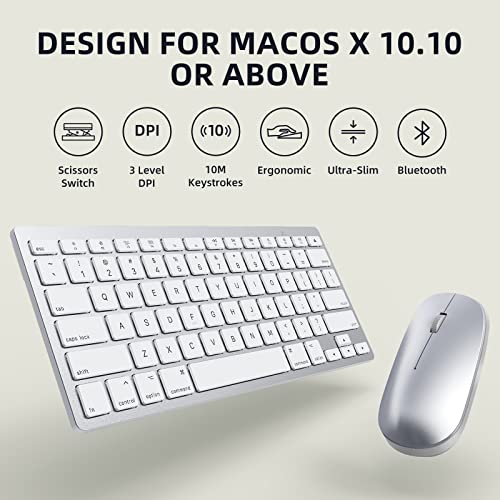
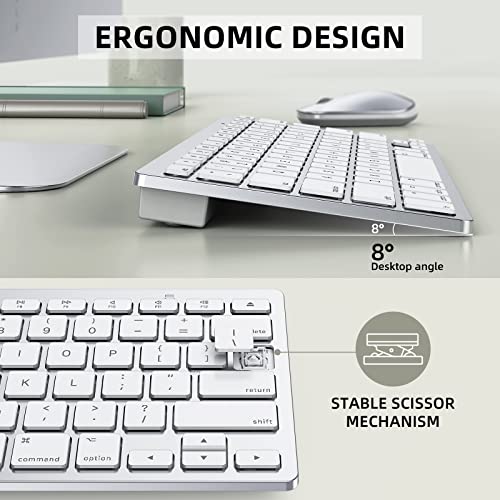
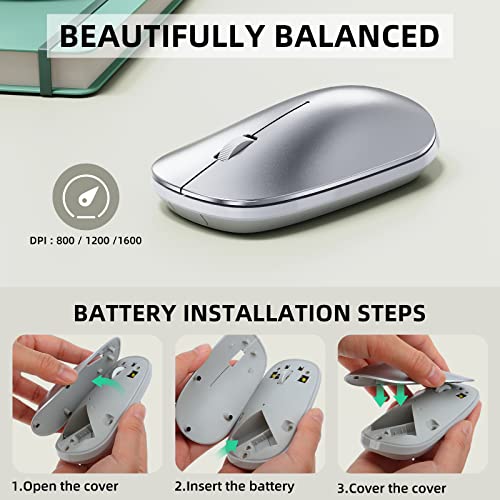
The OMOTON Ultra-Slim Bluetooth Keyboard and Mouse Combo is a wireless, battery-powered set designed specifically for Mac users running OS X 10.10 and above. Featuring scissor-switch keys for quiet, responsive typing and a mouse with 3 adjustable DPI levels, it offers ergonomic comfort with an optimized keyboard slope and anti-slip feet. Its energy-saving design includes an automatic sleep mode to extend battery life, making it a stylish, efficient, and budget-friendly upgrade for any Mac workspace.


| ASIN | B0BM8PLLY8 |
| Batteries Included | No |
| Batteries Required | Yes |
| Best Sellers Rank | #1,593,939 in Electronics ( See Top 100 in Electronics ) #1,372 in Keyboard & Mouse Sets |
| Brand | OMOTON |
| Compatible Devices | Laptop |
| Connector Type | Bluetooth |
| Country of Origin | USA |
| Customer Reviews | 4.2 4.2 out of 5 stars (518) |
| Date First Available | 7 July 2023 |
| Does it contain liquid? | No |
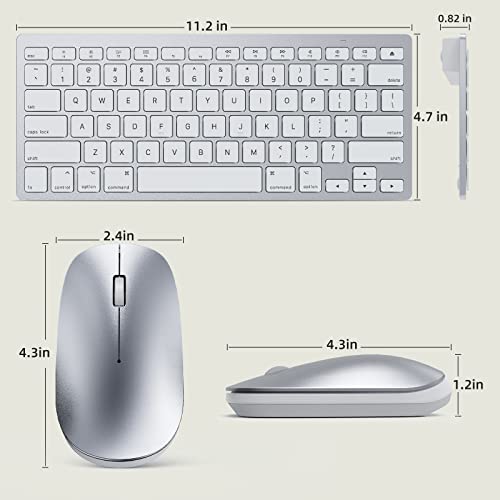
| Item Dimensions LxWxH | 28.5 x 12 x 2 Centimeters |
| Item Weight | 431 g |
| Keyboard Description | Indoor |
| Manufacturer | OMOTON |
| Movement Detection Technology | Optical |
| Number of items | 1 |
| Operating System | Mac OS |
| Power Source | Battery Powered |
| Product Dimensions | 28.5 x 12 x 2 cm; 431 g |
| Special Features | Ergonomic |
F**H
Teclas do teclado pararam de funcionar com menos de 6 meses de uso.
J**U
I recently had the pleasure of replacing my Mac setup with a new wireless keyboard and mouse, and I must say, the Omoton combination has certainly met my expectations. First and foremost, the price point of this wireless keyboard and mouse set is a major standout. It provides exceptional value for the features it offers, making it an affordable yet high-quality choice for Mac users on a budget. The package includes both the ergonomic keyboard and a responsive mouse, ensuring that you get a complete and cost-effective solution for your computing needs. The pairing process was a breeze, and I was up and running in no time. The Bluetooth connectivity seamlessly integrated with my Mac, eliminating the need for any complicated setups or additional software installations. The straightforward pairing process is a significant advantage for users who value simplicity and efficiency in their devices. The keyboard boasts a comfortable key layout with a satisfying tactile feedback, promoting a comfortable typing experience for extended periods. The low-profile keys contribute to reduced typing fatigue, and the layout is intuitive for Mac users, enhancing overall usability. The ergonomic design also extends to the mouse, which fits perfectly in the hand, reducing strain during prolonged use. The responsiveness and precision of the mouse make it a reliable companion for various tasks, from creative work to everyday browsing. Overall, the Omoton wireless keyboard and mouse combination is a fantastic addition to any Mac setup, delivering a perfect blend of affordability, ease of use, and ergonomic design. If you're in search of a reliable and budget-friendly replacement for your Mac peripherals, this set comes highly recommended. Upgrade your workspace without breaking the bank and enjoy the seamless convenience of Omoton's wireless keyboard and mouse.
T**U
Bought this for my work laptop to alleviate some neck pain I've been developing but didn't want the clutter of wires everywhere. Pros: convenient; sleek; keyboard reliable and ergonomic. Cons: mouse connects only half the time and not very ergonomic; bluetooth keyboard is slightly larger than MacBook keyboard so I bump the wrong keys sometimes. Overall happy with the keyboard but the mouse needs improvement. Not bad for the price point.
Z**X
trash. has delay and its as cheap as the price
B**N
UPDATE: I dropped a star because of three things: 1) having to pick up both mouse and keypad to turn them on after walking away for 5 minutes, 2) the mouse automatically connects bluetooth when I turn it on, but the keyboard always requires me to connect with the bluetooth icon on the computer. It's already kind of annoying that when I have to wake up the computer after 5 minutes, I have to turn on both again, but one bluetooth connecting and the other not is annoying. 3) the mouse has developed an annoying squeak on the roller when it's rolled backward. This is very similar to my Apple Air laptop keypad in terms of configuration. The keys are in almost the same placement, and the bluetooth connections are solid - except that the mouse connects almost automatically, however the keyboard I usually have to click the bluetooth icon to get it to connect. Keyboard is a little loud and clicky. The placement of the connection/on-off buttons on the back of both the keypad and the mouse is a little cumbersome - it would have been better to place them on top so you don't have to pick both items up to turn them on - but for the price it's a small quibble. The only thing that's really annoying is that the arrow controls on the far right side of the keyboard are a *little* just a little off in placement to the Mac, and so when working on a spreadsheet and hitting shift, many times my finger just brushes one of the arrows and bam! the cursor puts me somewhere else on the document - extremely frustrating.
Trustpilot
1 day ago
1 month ago