


🚀 Elevate Your Graphics Game — Because Your Setup Deserves the Best
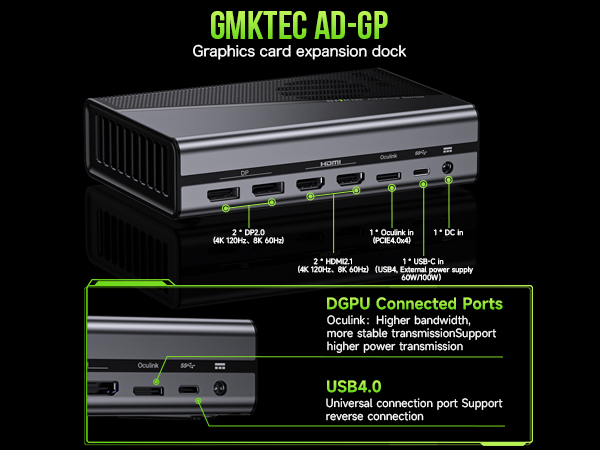
The GMKtec AD-GP1 is a cutting-edge external GPU docking station featuring the powerful AMD Radeon RX 7600M XT GPU with 8GB GDDR6 memory. It supports quad 8K@60Hz displays via HDMI 2.1 and DisplayPort 2.0, and offers ultra-fast Oculink and USB4 connectivity with 40Gbps bandwidth. Its compact, lightweight design makes it perfect for professionals and gamers seeking to dramatically boost graphics performance on laptops, mini PCs, and consoles with effortless plug-and-play compatibility.


| ASIN | B0DTP9MCQY |
| Best Sellers Rank | #7,509 in Computers & Accessories ( See Top 100 in Computers & Accessories ) #600 in Laptop Docking Stations |
| Brand | GMKtec |
| Built-In Media | GMKtec AD-GP1 eGPU Dock, Oculink Cable, Power Supply Adapter (20V 12A 240W ), Type-C Cable |
| Color | Black |
| Compatible Devices | Desktop (with USB4/Oculink Ports), Handheld Consoles (with USB4/Oculink Ports) Legion Go, Rog Ally X, Laptop (with USB4/Oculink Ports) (does not support Mac OS), Mini PC (with USB4/Oculink Ports) |
| Customer Reviews | 4.3 out of 5 stars 103 Reviews |
| Hardware Interface | DisplayPort, HDMI |
| Item Dimensions L x W x H | 6.45"L x 4.35"W x 1.57"H |
| Item Height | 0.1 inches |
| Manufacturer | Shenzhenshi Jimokekejiyouxiangongsi |
| Number of Ports | 7 |
| Total Number of HDMI Ports | 2 |
| Total Usb Ports | 1 |
| Warranty Description | 1 Year warranty |
| Wattage | 240 |
N**U
Amazing eGPU! Please read review if you're stuck on how to use it!
I had to return to this review because it was super long and I of course closed the window by accident.. UGH! I wish Amazon auto-saved your drafts.. Or even had drafts.. Anyway. There are a few things that you'll need to know when you get your eGPU. It doesn't come with a manual. It's fine. It doesn't need one. What it does require, however, is the ability to know how to plug something into your computer. That simple! You'll see two cords, an Oculink Cord and a USB 4 cord. Which one do you use? Depends, does your computer/laptop have an Oculink port? (It would be labeled 'Oculink'. If so, you use the Oculink cord. If it doesn't, use the USB cord). You plugged it in. Okay, so now what? Open your Adrenalin program. You should see a new update. Install it, and reboot. While it reboots, think outside of the box, but logically! If you're using a Desktop, go ahead and unplug your Monitor's HDMI from your computer to you eGPU (Since I *believe* the HDMI connects to the video card in your PC anyway, so logic states that it should connect to the video card within your eGPU). This step will save you an extra reboot and stress, because by doing this, you've just made your eGPU your Primary Graphics and your previous graphics driver your Secondary. Well done! Performance-wise, I've included a video of me playing Hogwart's Legacy. As you can see, the graphics are crisp, lag-free (I am also using a Sandisk SSD as well, which I highly recommend!) and clean. Functionally, it works as intended, bringing a crisper, more vibrant quality to your gaming experience. However, one caveat - When it comes to newer games, like Inzoi, you may still experience some lag. When I purchase that game, I'll include another video in order to show my experience with that one. Because this comes with an AMD Radeon RX 7600M XT graphics card built in, I feel like the value of the item is incomparable, because, to my knowledge, most other eGPU's don't come with graphics cards, just the units. So that in itself should be a clear indicator that this device is something great. When it comes to the noise level, there *is* some noise, but it's barely noticeable, and I have excellent hearing. All things considered, you should be very happy with this device, and I am sure you too will rate this the 5 stars it deserves.
J**Y
Impressive performance
I had previously purchased a GMKTek nukbox M7. I switched over to console gaming after PC components (and their prices) were changing faster than I could keep up with. Got the nukbox mini PC because my wife was wanting to get back into the Sims, and was not a fan of using a controller on a console. The stock computer was great, ran older games extremely well right out of the box. The limits of the integrated GPU were pretty obvious for current gen games right away though. The occulink port was a major deciding factor for the nukbox mini PC, and ordered this eGPU setup when I came across it. As I haven't been in PC gaming since 05, I am probably too easy to impress, but this eGPU paired with the mini PC performs phenomenally. Getting good framerates at 1080p and high to ultra settings on a number of current gen games. Atomfall on this rig is indistinguishable from the series X as far as my untrained eyes can tell. Picked up the Inzoi early access for my Sims fan wife. It runs very smoothly at 1080p on ultra. Literally plug and play simple. AMD GPU drivers are one version fits all, so very little fussing with drivers and settings. Great entry point for anyone wanting to get into PC gaming without investing $2000 (or more).
T**R
Tricky connections, great purchase
Connecting device to my Legion go is tricky, but once connected and running properly it works like a regular GPU. Nice and portable for travel and more than capable of playing popular titles.
N**S
Working on Rog Ally X, Plug N' Play (Updated)
EDIT/Update: A few weeks on the road, if you are having trouble getting this thing to connect to a monitor after the initial install. Reboot and then Uninstall it in Device Manager, this prompts my AllyX after a few seconds to reinstall it correctly. No complaints on performance still, powers 2 monitors, one of those 4k. Sometimes 3 when in a hotel fairly well. I will say the only things I dislike is the setup, having the power brick built in probably would be more convenient. It is still much smaller than many EGPU enclosures though. This would be a great device for someone that only needs the power of an EGPU at home and still in a fairly small package. Then unplug your handheld and roll out Handles games like Tarkov on pretty high settings well enough for me to be comfortable playing When compared to the prices of other 7600mXT EGPUs it has stacked up well. This field looks to be heating up though so keep an eye out for newcomers and keep comparing those prices. I wish it had a USB connection outside of the USB4 connector. Original Review: I'm going to update this later after a few weeks of use on the road. However first impression looks good, it was a plug and play setup, once plugged into the rog ally x, did a windows update, rebooted and change display settings when back up. Ran a test bench with decent results, running two monitors no issues
S**K
Does not work with Windows 11
Not compatible with windows 11 AMD processors, games like Ghost of Tushima, Assassins creed shadows Fall out 4 crash at random or refuse to launch and restart computer. Worthless POS DO NOT BUY THIS Piece of C&;@p!!! Games acknowledge hardware, but always crash or freeze when below or equal with this hardware specs. Buy something else. After 5 minutes it stops working,hence crashes and restarts.
A**X
Well worth it for the price, but where is the power button?!?
With this E-GPU under 500 dollars consistently, its a great value and I had to get it. I have a gpd win 4, and while gpd's own e-gpu does have handy features like a built in usb dock and, ya know... a power button, it's also about double the price. I resorted to getting a little plug power switch so I don't have to plug/ unplug it every time I want to use it. I can't fathom why they didn't put a power button on a device that needs to be off when plugging/ unplugging oculink, but if your willing to work around this flaw you have a great product at a great price. It has worked perfectly for me, with a super quiet fan and the expected significant performance gains. Overall I'm pleased with the GP1 e-gpu, and am glad I got it. (Just maybe add a power button next time)
B**Y
12 months on, I still love that I bought it. Roomscale VR, 1080p, 2440o, even 4K is great with it.
Short version: Playing on an AMD Ryzen MiniPC over USB 4 (so, Thunderbolt 3/4), with Windows 11 and also Windows 10. As long as both devices have correct power plus you use a reliable Thunderbolt cable it should work great for any application. I would troubleshoot issues "following the flow of power." Longer Details: I have been using my 7600M XT eGPU for an entire year now, and I bought it with my own money from Amazon. GMK aren't paying me at all for this, I would absolutely shill for them if the opportunity arose, but I just need to tell people that this thing is a little beast and that it does EXACTLY what I needed it to. Its performance matches, pound for pound, the compute performance of a 3060, or of a 1080 Ti, but with all of the FSR and modern features goodness you'd expect from a modern GPU purchase, and it does it inside of 120w of power. With enough framegen, I'm playing 4K at 60fps on the games I care about. I'm able to play any game I own at 1080p, often on maxxed settings, and generally without relying on framegen (I don't do modern FPS's, it's mostly RTS's and casual pew pew games with friends, or full roomscale VR). I just beat HalfLife:Alyx with a Quest 3 streaming the game via my AD-GP1 for the third and probably final time, but point being it lets me take my PCVR setup truly mobile because I could play from my AirBNB while traveling in another country while leaving my full gaming rig at home. It was absolutely worth the $500 price tag (the lowest of any vendor slamming these in eGPU's today) and it is essential for my travel kit. My ONLY complaints about the thing is lack of USB passthrough (despite calling itself a docking station it is exclusively for graphics compute) and the face that the power brick is heavier than *it* is,. The PSU is good and heavy, too, and so I've been obsessing for days to learn about the power profile, the voltage stability, the (complete lack of) Power Limiting options, etc, and the takeaways I've got from this quest are threefold: 1. They do NOT want you messing with its firmware or capabilities with any of the popular off-the-shelf mod tools. It is view-only for most of the settings in MSI Afterburner, and AMD Adrenaline doesn't even show the Power Limit menu at all because they have this thing HUGGING the 120w limit and not letting that go. (I wanted to attempt to undercurrent it and run it at 80% but I've still not found a way). 2. This thing is good enough for SteamVR and I beat HL:Alyx on PC Vr, streaming to a Quest 3, using it strapped to a Ryzen 7735HS MiniPC that is smaller than the eGPU itself. 3. The performance hit and latency from using Thunderbolt/USB4 is negligible, and I haven't needed to upgrade to a machine that will drive Oculink. Plus, hot-swapping instead of DisplayPort rebooting handshakes, is sweet. This doubled the cost of my miniature gaming computer, but it also extended its capabilities well beyond, and was a multiplier for value for me. When the Steam Machine comes out early next year, I expect its GPU performance will be slightly **WORSE** than, but definitely in line with, the value of this eGPU, because they list 28 CU's while the XT in this kit is 32 CU's. So if you want performance NOW or want to avoid the mini-upgrade-new-device later, this is perhaps valuable for your games, too. I'm writing this review months after purchase because I am over-the-moon about it, having just spent 7 hours trying to get around its safety measures (If I could get the TDP under 100w I could try powering it with a USB PD 3.x power brick, which would save me a LOT of storage space and weight in my travel backpack) and in doing so learned just how solid the thing is while I benchmarked the living !?@! out of it. I hope GMK sells a million of them and that this product category expands.
O**O
Great performance, but no USB ports, and very annoying fan profile
The performance is great, especially for the price. With that out of the way, let's talk about two gigantic negatives on this device that make me question reality. 1) Four monitor ports, zero USB ports -- Really?! GMKtec thinks that's a good balance? What kind of power user buys a sub-$500 video card for QUAD MONITORS? Are you serious right now? Just give me a *SINGLE* USB 3+ port so I can plug a hub into it, then I only need to plug a single cable into my laptop and it can be a true dock. It doesn't even have to be USB-C. Just something, anything, please! It's such an unbelievable oversight that I'm deducting two stars for it. Cost is no excuse. Drop one of the monitor ports, replace it with a single USB port, your product will be ten times as good and will cost the exact same. 2) Overly aggressive, non-customizable fan profile -- For some reason this thing is just way too audible when idling at just 50C. It's not loud, but you can absolutely hear it. I timed it, and it basically does this in a non-stop cycle: fan on for 8 seconds, fan off for 15 seconds. The short cycle is what makes it extra aggravating. It gets louder during gaming of course, and that's expected, but it's a reasonable volume for gaming and the noise is mostly masked by the game's music and sound fx. I had previously tested the GPD G1 eGPU, which has the same AMD 7600M XT under the hood, but it was probably twice as loud as this thing is, because it was as thin as a laptop. So the noise when gaming is acceptable with the GMKtec, but the idle noise is just insanely unnecessary. Please let me customize it. My laptop is completely silent sound unless it's under load. This eGPU should behave the exact same.
Trustpilot
2 weeks ago
2 months ago



